
UI Layout Misalignment

Summary
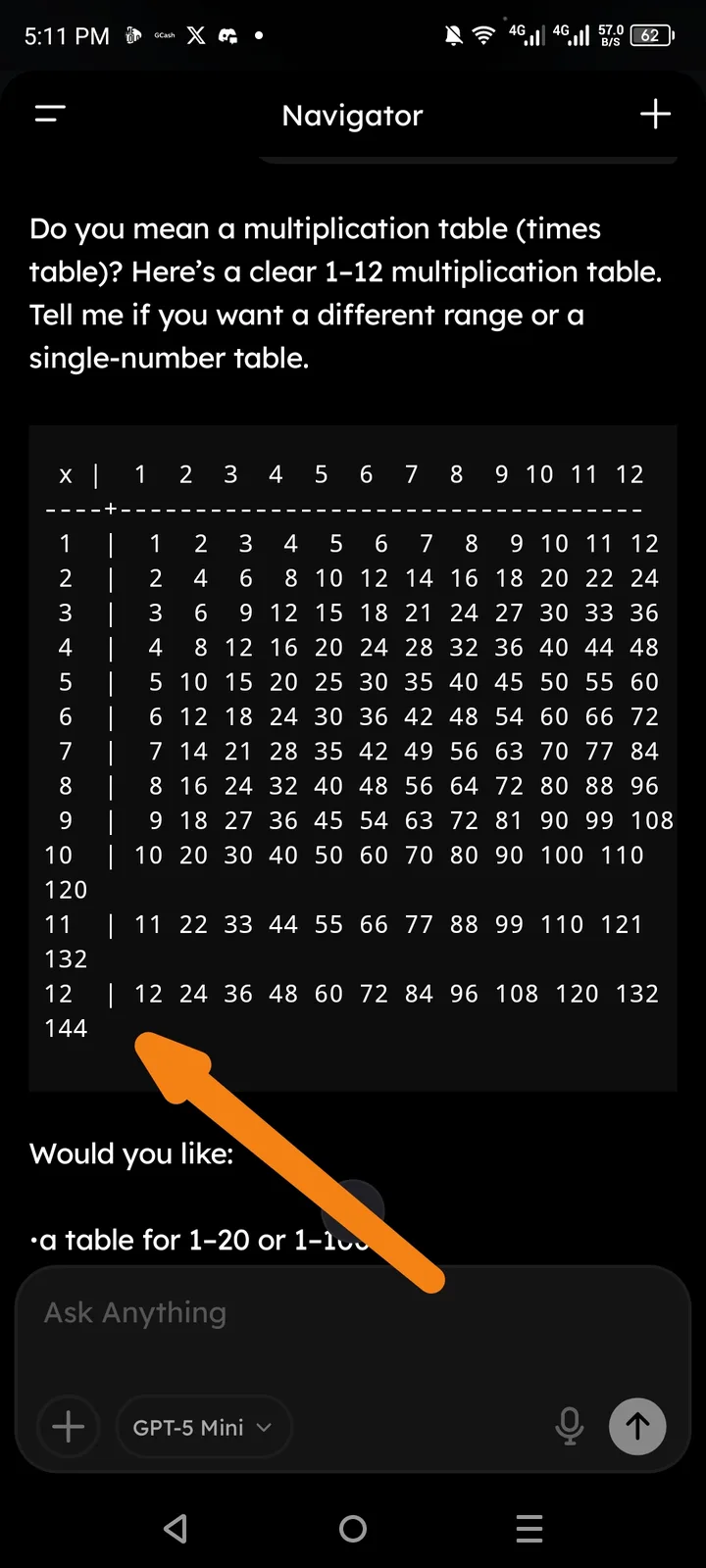
Arcsphere is experiencing significant UI alignment issues where generated content—specifically tables (such as multiplication tables or data grids)—does not properly align within the chat or display window. Columns often overlap, text bleeds out of containers, or vertical borders fail to match headers, leading to a cluttered and unprofessional appearance.
Steps to Reproduce
- Open the Arcsphere browser and start a new AI chat.
- Input a request that requires a structured layout (e.g., "Generate a multiplication table from 1 to 10" or "Create a 5-column table of top crypto assets").
- Observe the rendering of the table once the AI provides the response.
- Resize the window or switch between portrait and landscape mode (on mobile).
Expected Result
The content should be perfectly aligned within a responsive grid. Columns should have consistent spacing, and text should be centered or left-aligned within its respective borders without overlapping adjacent content.
Actual Result
- Column Drifting: Columns do not stay vertically aligned as the table progresses downward.
- Text Overflow: Long text strings in one cell cause the entire row to misalign with the header row.
- Container Clipping: On mobile devices, the right-side columns are often cut off or clipped by the edge of the chat bubble, with no horizontal scroll option.
Proposed Fix
- Implement Fixed Table Layouts for AI-generated markdown tables.
- Add Horizontal Scrolling for any data structure that exceeds the viewport width of the chat bubble.
- Standardize cell padding and margin in the global CSS to prevent text bleeding.