
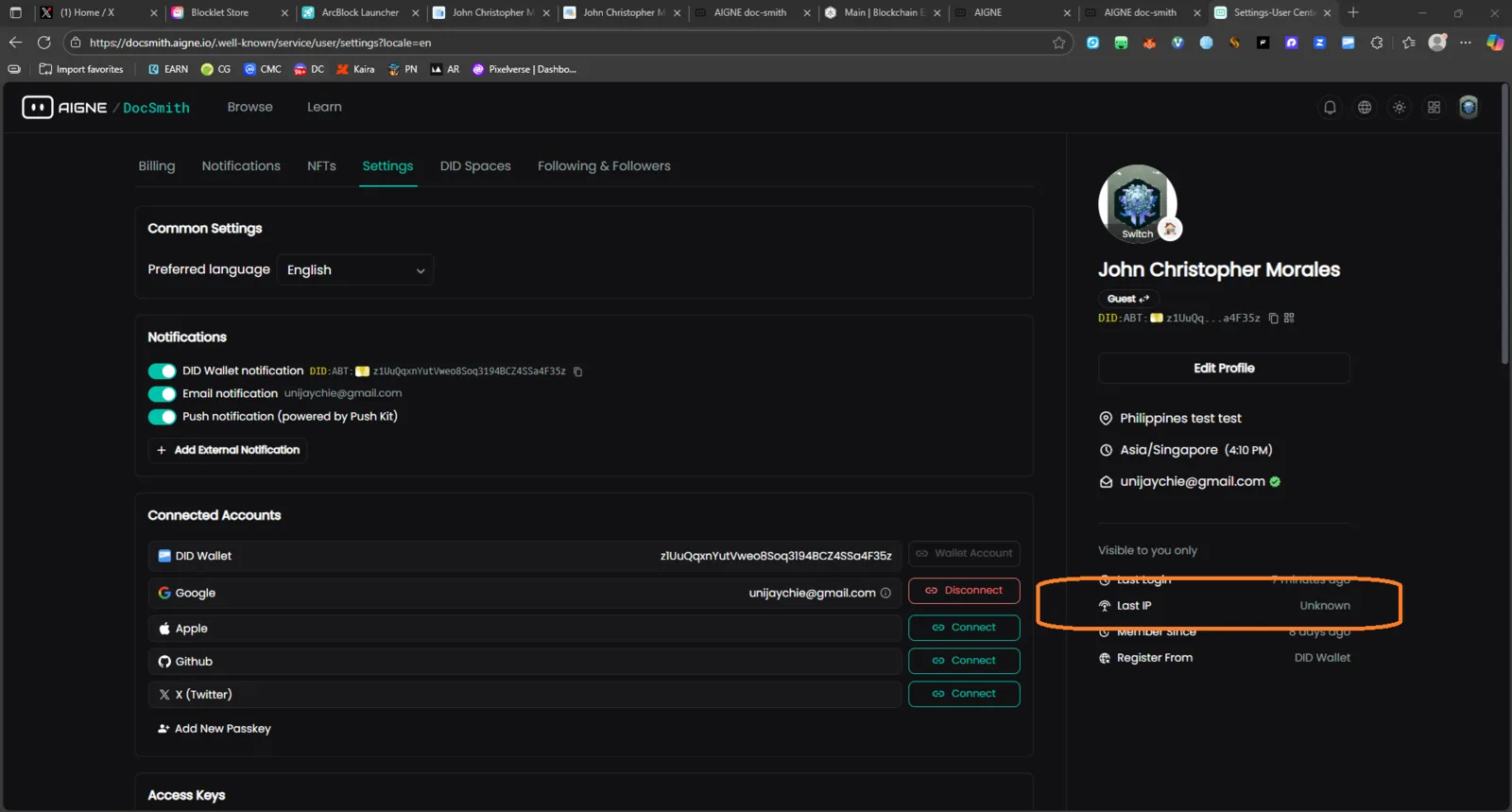
“Last IP” Displays as “Unknown” in User Settings

🧾 Description
In the User Settings page, under the profile summary panel, the “Last IP” field always displays “Unknown” even when the user is logged in and actively using the platform.
This issue persists despite a successful login session and accurate timestamps for “Last login.”
🔁 Steps to Reproduce
- Go to User Settings Page
- Log in with your DID Wallet.
- Check the right-side profile summary panel.
- Observe the “Last IP” value — it shows as “Unknown.”
✅ Expected Behavior
The “Last IP” field should display the user’s recent login IP address for transparency and security auditing.
❌ Actual Behavior
The system displays “Unknown” for the “Last IP,” even for active sessions.
📊 Impact
- Users cannot verify the IP of their last login.
- Reduces account security awareness (potential login monitoring).
- May cause confusion for users checking unauthorized access.
🧩 Possible Cause & Suggestion
- The backend may not be logging IP addresses during DID Wallet authentication.
- Suggest verifying that IP logging is enabled for web-based logins and properly passed to the user profile data.
1 条回复
Which DID Wallet are you using?