
Image Generation Proceeding Without Required Base Image

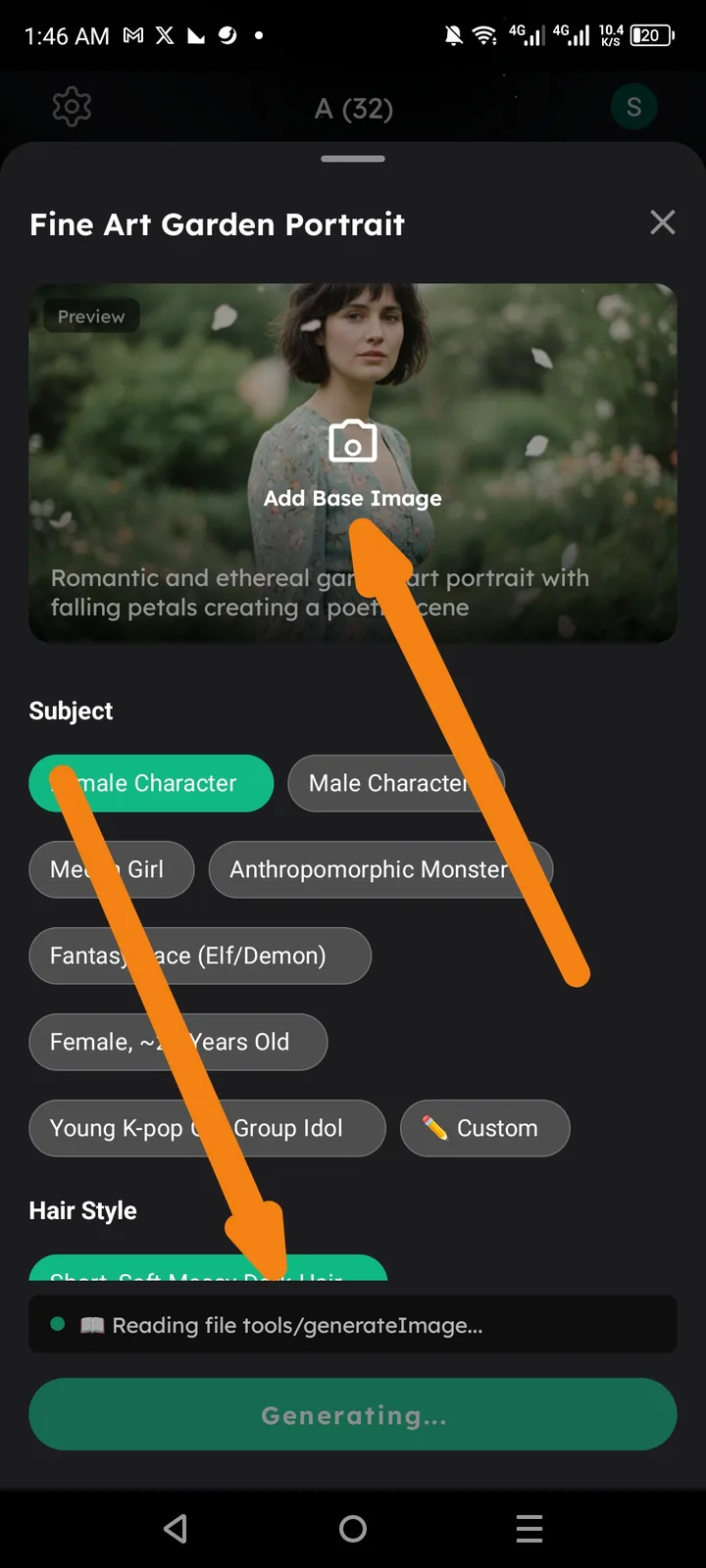
Summary: The Arcsphere image generation tool (e.g., "Fine Art Garden Portrait") allows the generation process to start even when the "Add Base Image" requirement has not been fulfilled.
Component: Arcsphere -> Image Generation / Fine Art Garden Portrait Tool
Description: The UI indicates that a "Base Image" should be added to the generation request. However, after selecting the Subject and Hair Style, the "Generating..." state is triggered and the tool begins "Reading file tools/generateImage..." despite the "Add Base Image" slot being empty. This suggests a lack of validation logic to ensure a photo is uploaded before the action is performed.
Steps to Reproduce:
- Open the Arcsphere "Fine Art Garden Portrait" tool.
- Select a Subject (e.g., Female Character).
- Select a Hair Style (e.g., Short, Soft Messy Dark Hair).
- Do not upload or click "Add Base Image."
- Click the primary action button to generate.
- Observe that the app proceeds to the "Generating..." state.
Expected Result: The "Generate" button should remain disabled or an error message should appear requesting the user to "Add Base Image" before the process can start.
Actual Result: The tool attempts to generate the image without a source/base photo.