A security hardening release for Blocklet Server

We recently completed an in-depth security review of Blocklet Server, using AI assistance to cover far more of the codebase than a manual pass allows. It surfaced a set of issues in authentication, authorization and logging. Each was fixed within days of being identified, every fix is published, and the servers we operate are already running them.
- Affected: all releases up to and including
1.17.12 - Fixed in:
1.17.13-beta-20261019-082907-fe71de61and later - If we host your apps — nothing to do. Our servers already run the fixed build.
- If you self-host — please move to the beta channel, which carries the fixes.
Updating is all that is needed. The optional section at the end describes extra steps some operators like to take; none of them is required.
What the review covered
We traced every kind of credential the server accepts across every path that accepts it, and reviewed what the server writes to logs. The issues fell into three groups, and each is now closed:
- Authorization scope. In some paths a credential could be accepted for actions beyond the scope it was issued for. Those paths now verify the credential against what is actually stored and permitted.
- Logging detail. Some internal values were written into logs and webhook payloads in more detail than they needed to be. They are now redacted at the source.
- Input validation. Several endpoints did not sufficiently constrain URLs and identifiers supplied by callers. Those constraints are now in place.
Every fix is a separate fix(security) commit in the public repository, so you can read exactly what changed and when.
Alongside the code changes we refreshed credentials on our own infrastructure, narrowed network access to our servers, and improved monitoring — ordinary hygiene that is worth doing whenever auth code changes.
If we host your apps
Nothing to do. Our servers are already on the fixed build.
As part of the update we rotated session signing keys, which is routine when authentication code changes. Sessions and refresh tokens issued before that are no longer valid, so you will be signed out of the dashboard and of your apps once — sign in again and everything continues as before. Your apps, data, domains and app identities are unchanged.
If you self-host Blocklet Server
Please move to the beta channel, all published versions are listed on npm.
Use the beta channel, not stable. The current stable release
1.17.12does not contain these fixes — install the beta CLI explicitly, as shown below. Everything will be folded into the next stable release.
You run an official release
npm i -g @blocklet/cli@beta

blocklet server stop
blocklet server start

blocklet --version        # expect 1.17.13-beta-20261019-082907-fe71de61 or newer
blocklet server status
Installing the package alone is not enough — the server must be restarted for the new code to take effect. Confirm with blocklet --version afterwards.
You build from source
Pull the latest code from the public repository and rebuild. All of the fixes are there, each as its own fix(security) commit, so you can review them before you ship.
Optional, if you want extra assurance
None of this is required. Being on the fixed version is enough. We are documenting these because operators sometimes ask for them, and because they are good practices to know about regardless.
Rotate session keys
Invalidates every session and refresh token already issued, for the server and for all installed apps. Everyone signs in again.
blocklet server rotate --dry-run   # lists what would be rotated, changes nothing
blocklet server rotate

blocklet server stop
blocklet server start              # required for the new keys to take effect
Rotate an application's key pair
If you want an application to get a fresh key pair, you can do that from the dashboard. The app owner approves it with their DID Wallet, and the key migration is recorded on the ArcBlock chain — any assets held by the application's account are carried over automatically, so there is nothing to move by hand.
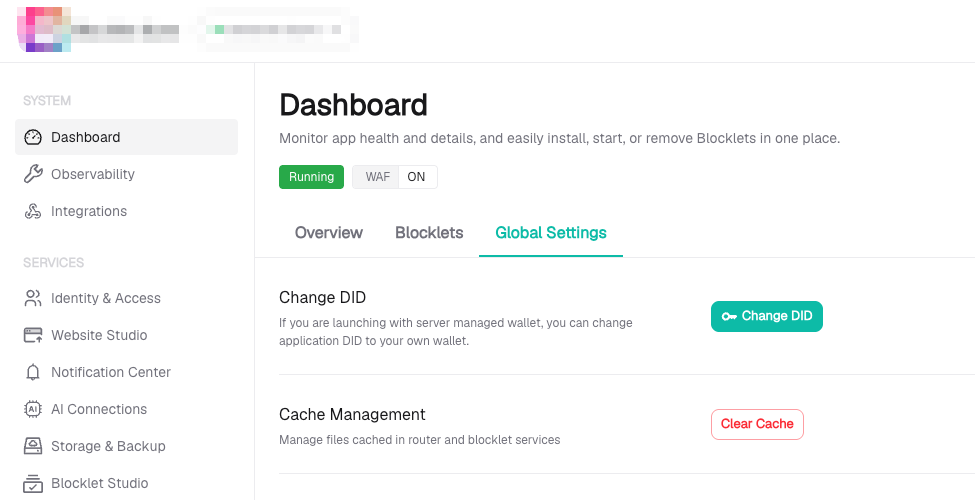
A few things to know before you start:
- Only the application's owner can perform the rotation.
- The application must be on the latest application structure. If it is not, migrate it first — the dashboard will tell you.
- The application restarts once the rotation completes, so expect a brief interruption for that app.
Move to a new machine
Some operators prefer to rebuild a host from a fresh image periodically. If you want to, you can migrate app by app:
- Provision the new machine and install the same version:
npm i -g @blocklet/cli@beta - Initialize it, which creates a new server identity:
blocklet server init - On the old host, export each application while the old is running:
blocklet export --app-did <appDid> --out-dir /path/to/bundle - Stop the old host, move the bundle across and import it on the new host while it's running:
blocklet import /path/to/bundle - Re-point DNS to the new machine and re-issue certificates, this should be done automatically with DID Domain and DID DNS.
- Recreate server-level settings by hand: owner, trusted passports, access keys.
- Verify the new host fully, then stop the old one — keep it intact until you are satisfied.
What travels with the bundle: the application's DID, its key pair, its encryption key, its session salt, and all in-app user accounts and data. Users of your apps are not affected and do not lose their accounts.
What does not travel: anything at the server level — owner, trusted passports, routing rules, access keys, certificates. Expect to set these up again on the new machine.
Questions, or anything that looks wrong after updating — please reply in this thread. If you would rather report something privately, contact us directly and we will respond quickly.
Thank you to everyone running Blocklet Server. Keeping it worth your trust is the point of work like this.