
Pages Kit - Can't Publish New Pages

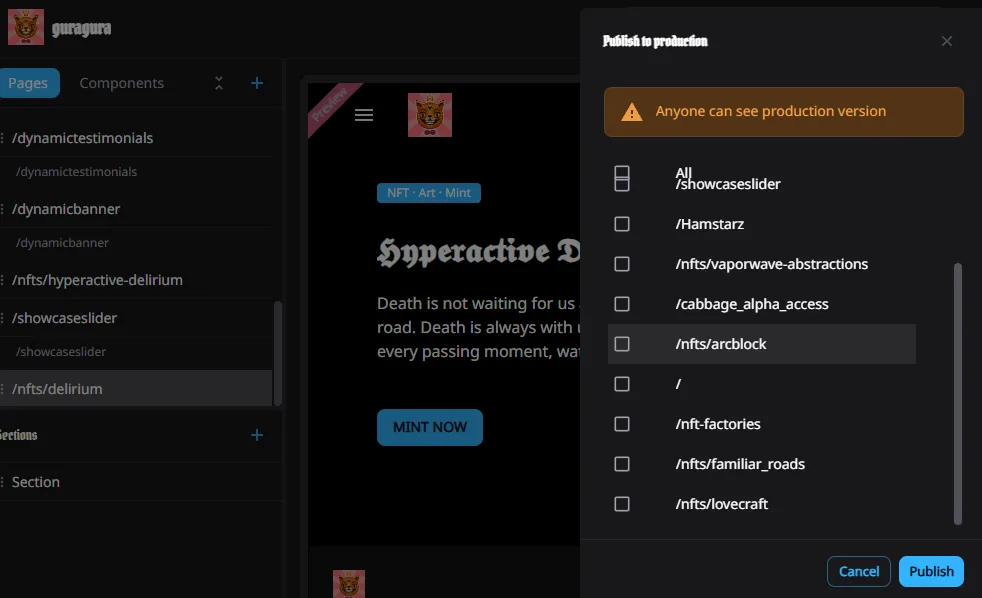
I created a new page from a copy of an existing page (/nfts/lovecraft) and renamed it /nfts/hyperactive-delirium. When I went to publish the copy of an existing page it didn't show in the list. Since I couldn't publish the copy of a page, I created a new page from scratch and filled in the info and image, but when I go to publish the new page it too doesn't show in the list. I have restarted and updated Pages Kit, but still nothing. Not sure what to do.
4 条回复
yo. when you make a new page you have to choose "auto create route". If you don't then you need to manually create a route on the site map page and then point to it in the "page template" area. Once you create a route it should pop up as a publishable page.
Thank you!!!!!
You are a gentlemen and a scholar!
I just had that same problem. it’s a little counter intuitive. but I guess it’s cool to be able to make pages without having them be “automatically“ set up for publishing.