
Appearance Settings / Accessibility

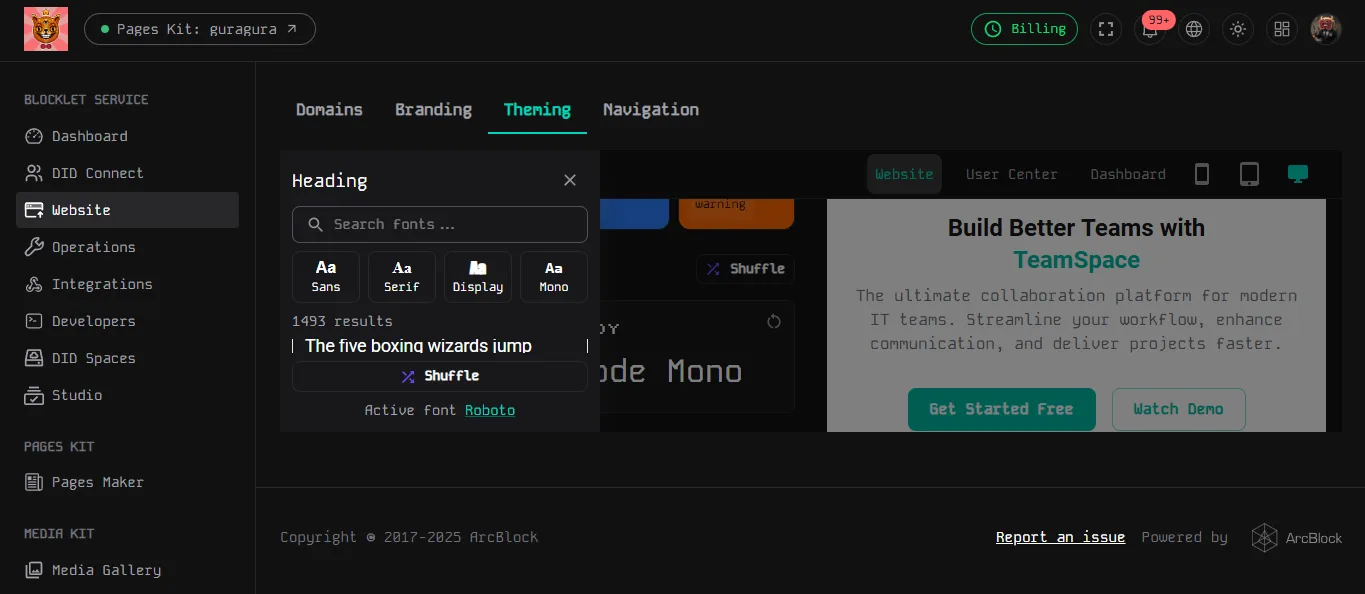
I was working from my laptop and was looking to explore fonts in my appearance settings and just realized I am unable to see the font list. It is hard to see immediately what I am looking at in this screenshot attached, but in the Heading section it says 1493 results. The problem is that there is no space to view the fonts listed. I can hover that section and hover but am unable to make anything out.
My screen resolution is 1366 x 766.
2 条回复
Hey there! 😊 Could you try zooming in or out on your page to see more elements in the theme editor? You'll find a font list with a vertical scroll bar, a search bar, and a shuffle button for picking fonts. If you already have a font in mind, just type it into the search bar. But if you're feeling adventurous and want a bit of surprise, go ahead and click the shuffle button! 🎉
Hey there! Just wanted to let you know that our upgraded version of the theme editor is almost ready to roll out, and it comes with a much smoother user experience. However, you might still encounter a few hiccups if you're using it in a browser with a smaller height. 😄