
Unlimited Password Attempts for DID Wallet Backup File

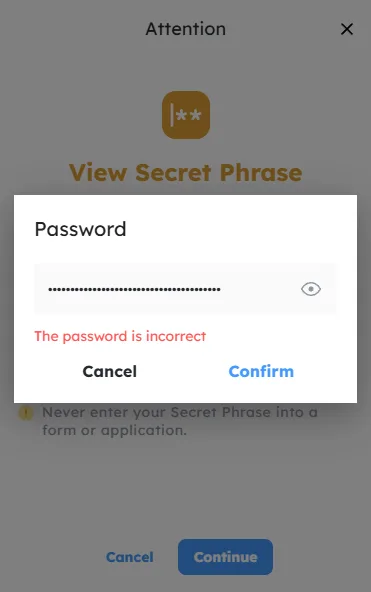
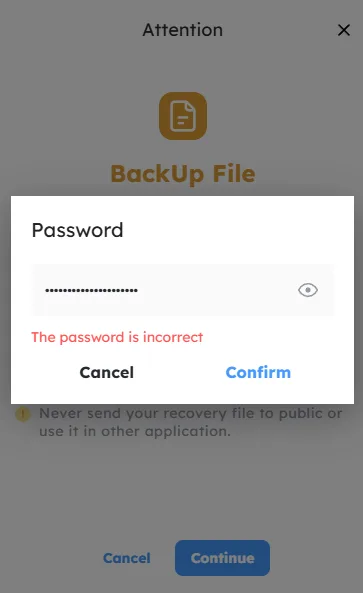
Bug Description
The DID Wallet allows users to attempt to open a backup file with an unlimited number of password attempts. This creates a security risk (e.g., brute-force attacks).
Steps to Reproduce
- Open the DID Wallet app.
- Attempt to open a backup file.
- Enter an incorrect password repeatedly (e.g., 100+ attempts).
- Observe that the app allows unlimited attempts without lockout.
Expected Behavior
- The app should lock access after a limited number of failed attempts (e.g., 3-5 tries).
Actual Behavior
- Users can attempt to open the backup file indefinitely.
Severity Classification
Severity: High
- Allows brute-force attacks on encrypted backup files.
- Violates security best practices (e.g., no rate limiting).
Suggested Fix
Frontend Fix
Add a rate limiter for password attempts:
javascript
let failedAttempts = 0;

const unlockWallet = (password) => {
  if (failedAttempts >= 5) {
    alert("Too many attempts. Try again in 5 minutes.");
    return;
  }
  // Validate password
  if (password === "correctPassword") {
    unlock();
  } else {
    failedAttempts += 1;
    alert("Incorrect password. Attempts left: " + (5 - failedAttempts);
  }
};
Backend Fix
Add server-side rate limiting:
python
# Example: Lock after 5 failed attempts
def unlock_wallet(password):
  if failed_attempts >= 5:
    raise Exception("Too many attempts. Try again later.")
  if not verify_password(password):
    increment_failed_attempts()