
Incorrect Quantity Validation in Checkout (Exceeds Limit)

🧾 Description
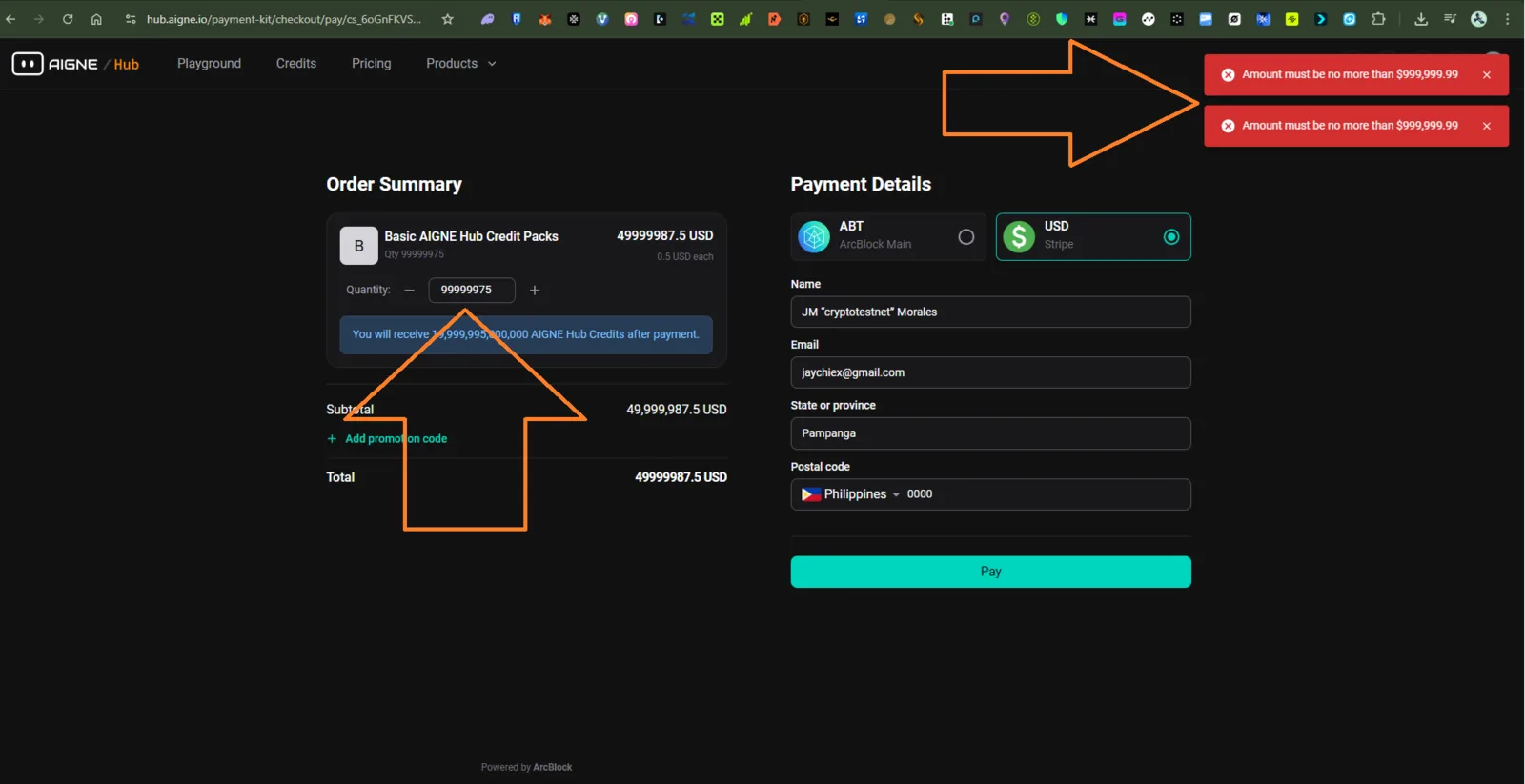
When attempting to purchase a large number of AIGNE Hub Credit Packs, the system allows entering an extremely high quantity value (e.g., 99,999,975) but then returns an error message stating that the amount must not exceed $999,999.99.
While the error message is correct, the system should prevent such high quantity input proactively through input validation or a quantity limit, instead of letting users proceed until the checkout error.
🔁 Steps to Reproduce
- Go to https://hub.aigne.io/payment-kit/checkout.
- Select Basic AIGNE Hub Credit Packs.
- Enter a large quantity (e.g., 99,999,975).
- Observe the subtotal and total fields display large amounts.
- Click Pay or attempt to proceed.
- Two red error messages appear:
- “Amount must be no more than $999,999.99.”
✅ Expected Behavior
- The quantity field should have an upper input limit that prevents exceeding the allowable purchase total before submission.
- Alternatively, display a dynamic warning message or disable the Pay button if the total exceeds the payment cap.
❌ Actual Behavior
- The quantity input accepts excessively large values.
- Only after submission does the system show two duplicate red error messages.
- The duplicated alert messages may confuse the user.
🧰 Environment
- Platform: AIGNE Hub
- Device: Desktop
- Browser: Chrome (Latest)
- OS: Windows 11
- Reproducibility: 100%
📊 Impact
- Severity: Medium
- Priority: Medium
- Impact:
- Poor user experience during checkout.
- Redundant error message may indicate duplicate validation calls.
- Possible backend strain if large quantity inputs are not rate-limited.
🧠 Suggested Fix
- Add frontend validation to cap the quantity value based on the maximum allowed total (e.g., $999,999.99 ÷ $0.5 = 1,999,999 units).
- Show a real-time warning when exceeding the allowed amount.
1 条回复
This is Stripe's verification. The payment amount cannot exceed $999,999.99. When you click "Pay", it will verify and return an error. This is in line with the interaction. The reason why it appears twice should be that you clicked twice in a row; clicking once will only return one error.