All published blocklets need to be updated when uploading a new release.
BTBrain Titan22个月前
i know, I just meant if the criteria keeps changing in short timeframes it takes a very long time to keep updating lets say over 50 blocklets for all changes
the new criteria was 16 aspect ratio screenshots last month. now it is 16 aspect ratio as of today
this is a minor inconvenience if a developer has only a few blocklets published, it won’t take long to change. but if a developer has many blocklets published it can take a long time and energy to change
I hope the team can take this advice on board
WAwangshijun22个月前(edited)
The 16 is the final decision and requirement, we will keep it forever.
BTBrain Titan22个月前
z1k7Ks2F6eWNeRWZxwnByDasrHCyLaQQfBG I made a new release for my blocklet, using the internal crop feature for the logo, tried to upload it to test store again and it gave me this new error:
BTBrain Titan22个月前(edited)
z1k7Ks2F6eWNeRWZxwnByDasrHCyLaQQfBG so the “aspect ratio” error dissapeared, but still have this error: “the logo (logo.jpeg) extension is not matching the real file extension (.jpg)
I tried to fix this by converting the logo image to .jpeg , but it still doesn’t work. so neither .jpg or .jpeg formats work for uploading to test store😕
I tried .png also, but then the image turns out too large (>500kb) and it cant even be uploaded in blocklet studio
WAwangshijun22个月前
Hi, have you tried renaming your logo from logo.jpeg to logo.jpg, that should work.
BTBrain Titan22个月前
yes, I tried both of those names. neither of them worked unfortunately
WAwangshijun22个月前
Can you share how your logo file is produced? What software was used to produce it? what software was used to compress it?
BTBrain Titan22个月前
produced using AI image here on ABT community
Then screenshot it on my phone and using this site for conversions to jpeg, png or jpg:
Have you tried uploading the original AI Image without any further processing? or any issues encountered?
BTBrain Titan22个月前
yep, that is what i used to do, upload it normally and it used to work. but as of today i get that error
i tried using the converter but still having the error
WAwangshijun22个月前
Just to confirm: you were uploading an AI generated image as your blocklet logo without any further processing and got image type mismatch error? that will help us narrow down the root cause.
BTBrain Titan22个月前
correct. the only “processing“ I used to do is crop it on my iphone to square shape, like so:
BTBrain Titan22个月前
also I was able to make a blocklet release. the mismatch error only appears once I try to upload the blocklet to the test store
i download my release and try to press “upload” on test store. i select the downloaded blocklet, and then the mismatch error appears
PZPengfei Zhu22个月前
i select the downloaded blocklet, and then the mismatch error appears
Which error has repeatedly occurred?
For this error(the logo (logo.jpeg) extension is not matching the real file extension (.jpg)?), the backend will detect the actual type of the image to see if it matches the file extension type. We will further optimize this restriction to make it easier for users to upload resources. However, for now, you need to provide the correct resource type."
PZPengfei Zhu22个月前
We have found the issue with JPEG uploads and confirmed that it is a bug. As a temporary solution, you can change jpeg to jpg."


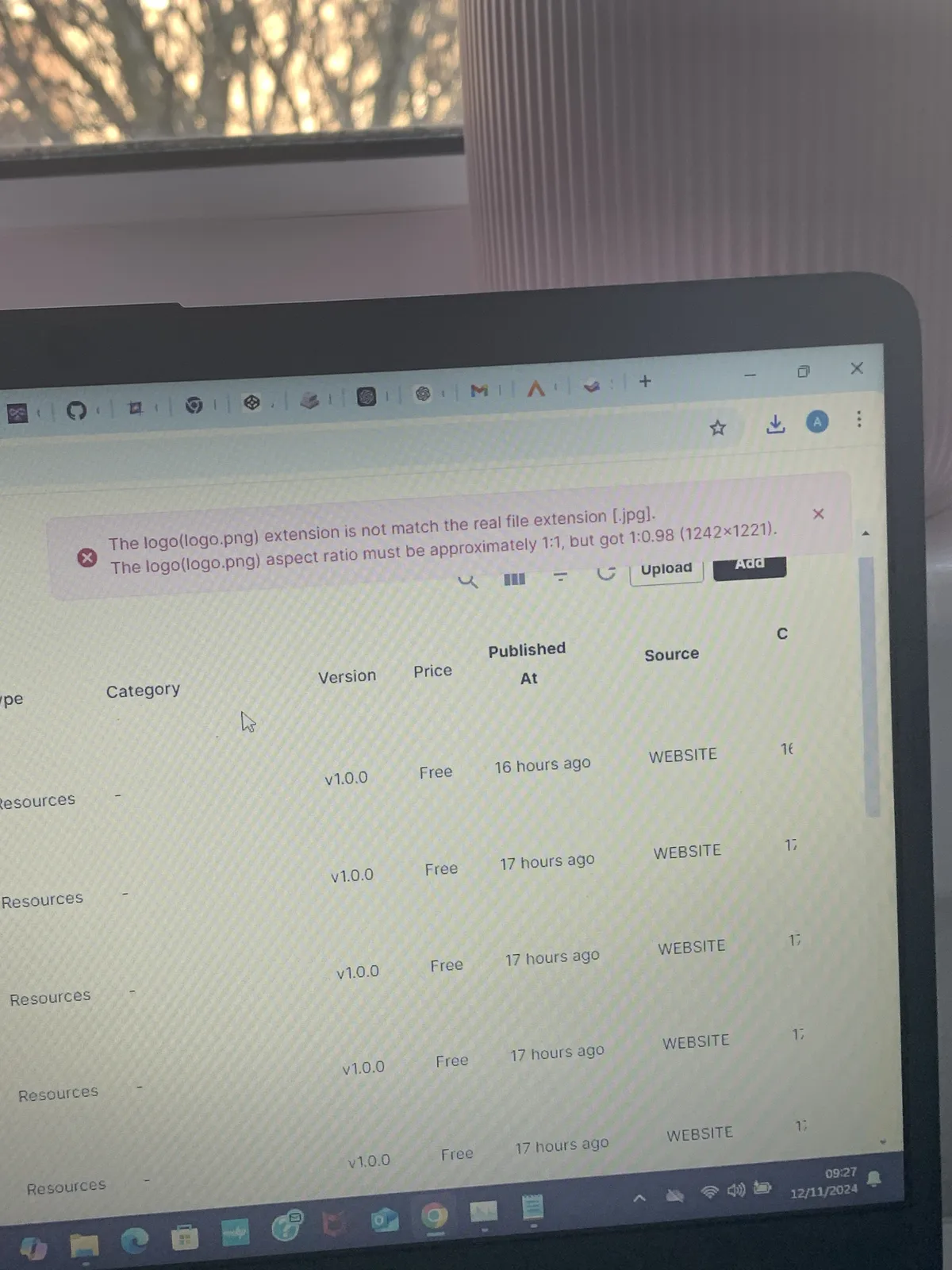
19 条回复
Hi, the blocklet logo must be square for the best display quality across the platform
You can leverage the latest crop feature in Blocklet Studio to ensure your blocklet logo size meets the requirement.
thanks
what implication does this have on already published blocklets?
I suppose this is another good example related to:
All published blocklets need to be updated when uploading a new release.
i know, I just meant if the criteria keeps changing in short timeframes it takes a very long time to keep updating lets say over 50 blocklets for all changes
the new criteria was 16 aspect ratio screenshots last month. now it is 16 aspect ratio as of today
this is a minor inconvenience if a developer has only a few blocklets published, it won’t take long to change. but if a developer has many blocklets published it can take a long time and energy to change
I hope the team can take this advice on board
The 16 is the final decision and requirement, we will keep it forever.
z1k7Ks2F6eWNeRWZxwnByDasrHCyLaQQfBG I made a new release for my blocklet, using the internal crop feature for the logo, tried to upload it to test store again and it gave me this new error:
z1k7Ks2F6eWNeRWZxwnByDasrHCyLaQQfBG so the “aspect ratio” error dissapeared, but still have this error: “the logo (logo.jpeg) extension is not matching the real file extension (.jpg)
I tried to fix this by converting the logo image to .jpeg , but it still doesn’t work. so neither .jpg or .jpeg formats work for uploading to test store😕
I tried .png also, but then the image turns out too large (>500kb) and it cant even be uploaded in blocklet studio
Hi, have you tried renaming your logo from logo.jpeg to logo.jpg, that should work.
yes, I tried both of those names. neither of them worked unfortunately
Can you share how your logo file is produced? What software was used to produce it? what software was used to compress it?
produced using AI image here on ABT community
Then screenshot it on my phone and using this site for conversions to jpeg, png or jpg:
https://www.freeconvert.com/jpg-to-jpeg
Have you tried uploading the original AI Image without any further processing? or any issues encountered?
yep, that is what i used to do, upload it normally and it used to work. but as of today i get that error
i tried using the converter but still having the error
Just to confirm: you were uploading an AI generated image as your blocklet logo without any further processing and got image type mismatch error? that will help us narrow down the root cause.
correct. the only “processing“ I used to do is crop it on my iphone to square shape, like so:
also I was able to make a blocklet release. the mismatch error only appears once I try to upload the blocklet to the test store
i download my release and try to press “upload” on test store. i select the downloaded blocklet, and then the mismatch error appears
Which error has repeatedly occurred?
For this error(
the logo (logo.jpeg) extension is not matching the real file extension (.jpg)?), the backend will detect the actual type of the image to see if it matches the file extension type. We will further optimize this restriction to make it easier for users to upload resources. However, for now, you need to provide the correct resource type."We have found the issue with JPEG uploads and confirmed that it is a bug. As a temporary solution, you can change jpeg to jpg."
Hi, the issue is fixed and deployed!