
Manual Typing Not Working in Publish Time (Start & End) on ArcBlock Blog

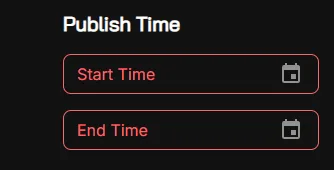
On the ArcBlock Blog (https://www.arcblock.io/blog/), the Publish Time input fields for both Start Time and End Time do not allow proper manual typing. Users are unable to directly enter time values, limiting flexibility when setting schedules.
Steps to Reproduce:
- Navigate to ArcBlock Blog.
- Go to the Publish Time section.
- Attempt to manually type in a Start Time.
- Attempt to manually type in an End Time.
- Observe that manual input is not properly recognized or fails to update.
Expected Result:
- Users should be able to type in custom Start Time and End Time manually, in addition to selecting from the date-time picker.
Actual Result:
- Manual typing in the Publish Time fields does not work correctly.
- The input does not update or apply as expected.
Bug Description: The date-time input fields for Publish Time are not properly handling manual input. Possible causes include:
- Input field restrictions blocking text entry.
- Validation errors preventing manual changes.
- JavaScript event listeners only supporting picker-based selection.
Severity Classification:
- Severity Level: 🟠 Medium
Suggested Fix:
- Enable manual text entry in date-time fields.
- Ensure validation accepts correctly formatted manual inputs.
- Allow hybrid input (picker + manual typing).
- Test across different browsers.
Priority: ⚠️ Medium – Fix needed for better content management workflow.
1 reply
感谢反馈, 这个问题有内部同事在今天中午报告过, 并且我们已经修复并部署