
Share Photo Edge Not in Dark Mode

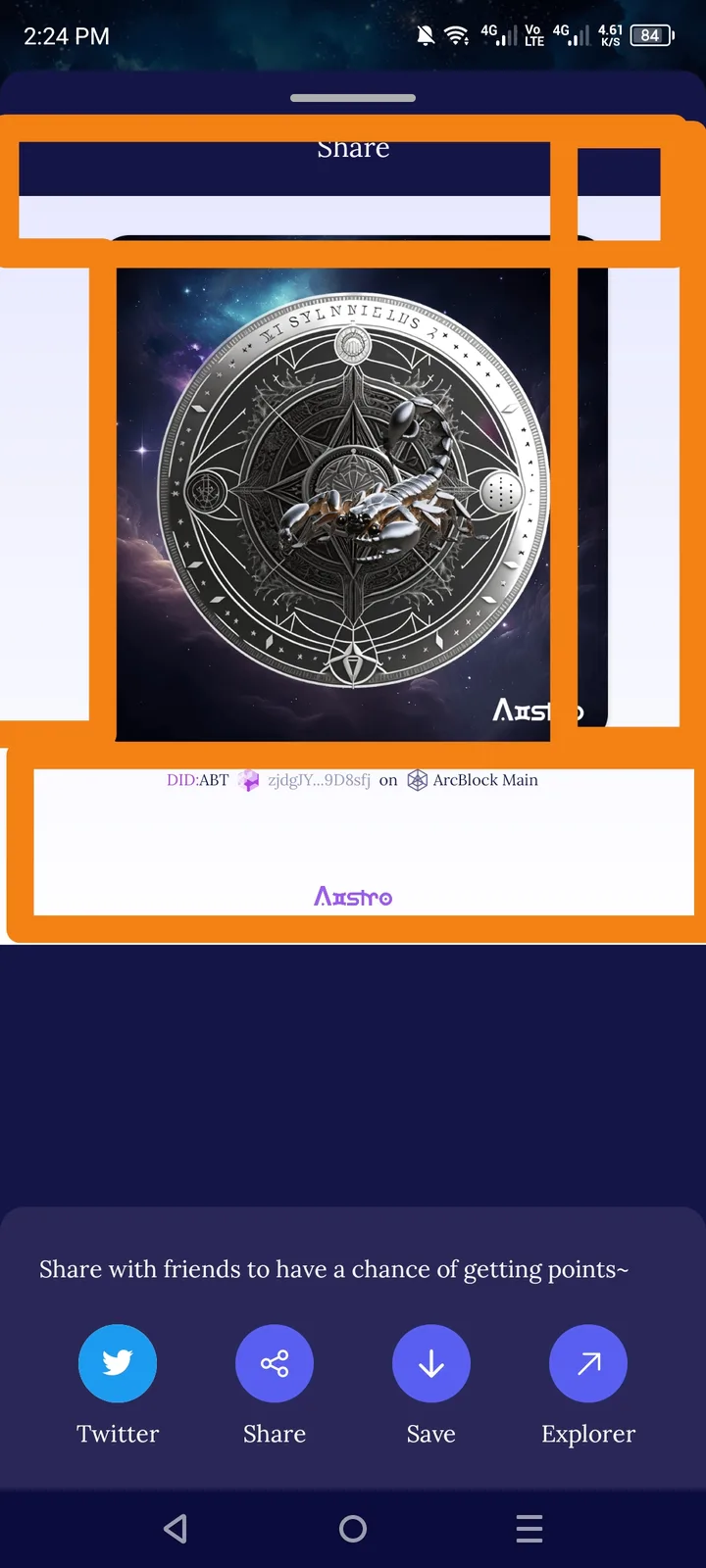
🧾 Summary: When sharing a photo in Aistro while using Dark Mode, the photo edge (frame or border) remains in light color (white) instead of adapting to dark mode styling.
🧪 Steps to Reproduce:
- Open Aistro App.
- Enable Dark Mode in settings.
- Go to Share → Add Photo.
- Select an image and preview before sharing.
- Observe the photo edges (borders or background).
💥 Actual Result:
- The edges around the photo remain light-colored, breaking the dark mode aesthetic.
- It looks inconsistent and distracting when sharing posts in dark mode.
✅ Expected Result:
- The photo edges/background should automatically adjust to dark theme colors (e.g., dark gray or black).
- Consistent dark UI should be applied across all share components.
⚙️ Possible Cause:
- The photo preview container uses a fixed light background color.
- Missing conditional theme styling for dark mode.
🧱 Severity: 🟡 Minor 🎯 Priority: Medium 📂 Category: UI / Dark Mode Compatibility
💡 Suggested Fix:
- Apply a dark mode-compatible background to the photo container or border.
- Use dynamic theme detection (
prefers-color-scheme: dark). - Test across multiple screen sizes to ensure uniform look. /
2 replies
你好,这边的背景是设计成这样的,为了让 NFT 呈现的更突出。
It's look much better with dark mode