
Missing “Favorite” Option for Skills

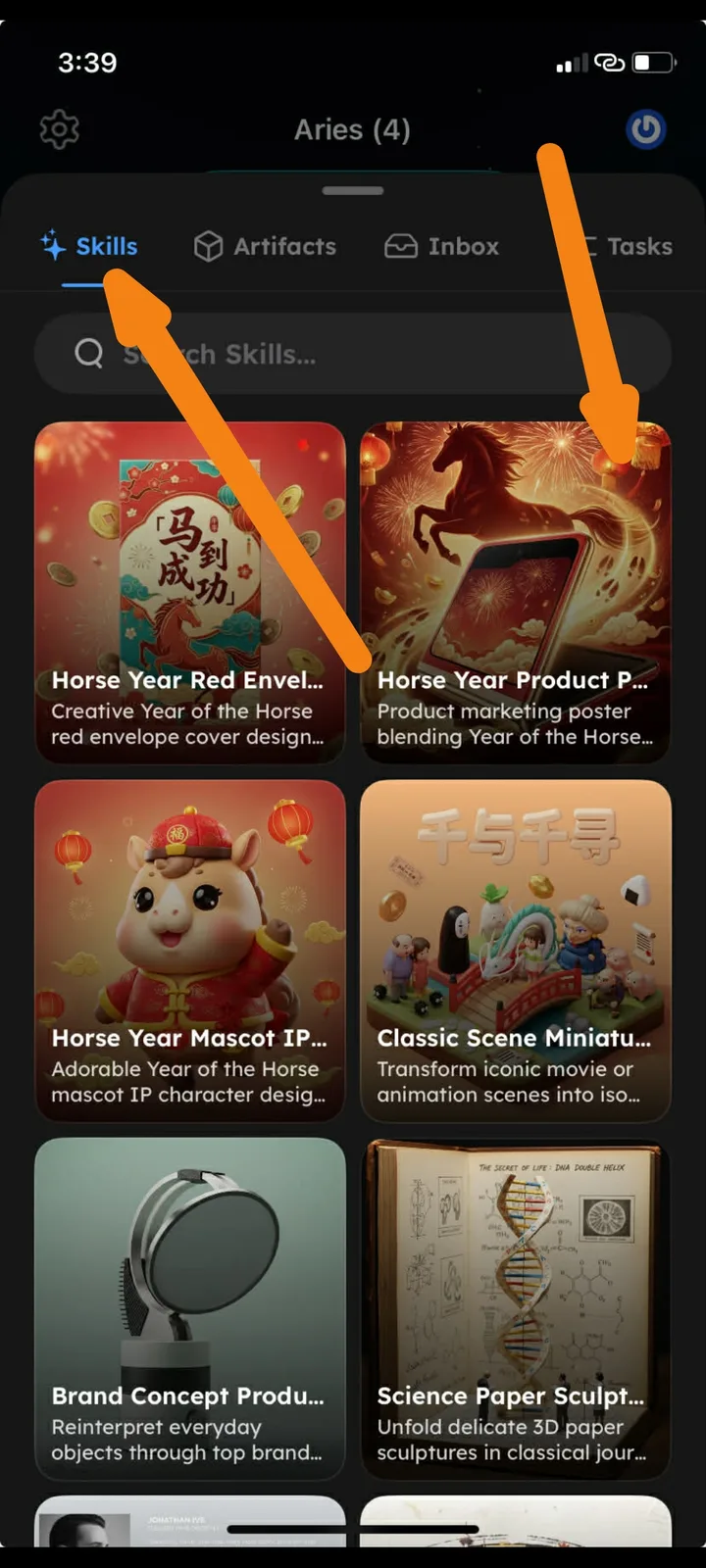
Device: iPhone XR
OS Version: iOS 18.7.3
Bug Description
In the AIGNE Skills section of ArcSphere, there is currently no option to mark or save skills as “Favorite.” Users browsing the available skills cannot quickly bookmark frequently used skills for easier access.
This makes it difficult to quickly reuse preferred templates or tools.
Steps to Reproduce
- Open the ArcSphere application.
- Navigate to AIGNE → Skills.
- Browse available skills (e.g., Horse Year Red Envelope, Horse Year Product Poster, etc.).
- Attempt to favorite or bookmark a skill.
Expected Result
- Each skill card should include a Favorite (⭐ or ❤️) option.
- Users should be able to save skills to a Favorites section for quick access.
- A Favorites filter or tab should be available.
Actual Result
- No Favorite or Bookmark option is visible on skill cards.
- Users cannot save frequently used skills.
Suggested Fix
- Add a Favorite icon (⭐ or ❤️) on each skill card.
- Create a Favorites tab or filter in the Skills section.
- Allow users to quickly access saved skills from their favorites list.