
Blocklet/CLI 1.16.20 App crash, "n.info is null"

 Ubuntu 22.04.03 LTS, kernel: Linux 5.15.0-1044-raspi, architecture: arm64
NodeJS versions 16,18,20 installed/tested, nvm installed
n/npm installed (10)
nginx (1.18.0, tested with and without being installed)
Ubuntu 22.04.03 LTS, kernel: Linux 5.15.0-1044-raspi, architecture: arm64
NodeJS versions 16,18,20 installed/tested, nvm installed
n/npm installed (10)
nginx (1.18.0, tested with and without being installed)
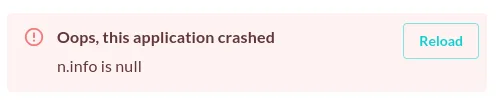
I received this error (picture) after installing blocklet/cli (-g option), blocklet server init, blocklet server start, finished installation, viewed dashboard, then went to install a blocklet. When installing blocklet/cli, there were depreciated warnings (will have to run setup again to copy over the output to here).
Output (with NodeJS 18,20):
npm WARN deprecated @npmcli/move-file@1.1.2: This functionality has been moved to @npmcli/fs
npm WARN deprecated stable@0.1.8: Modern JS already guarantees Array#sort() is a stable sort, so this library is deprecated. See the compatibility table on MDN: https://developer.mozilla.org/en-US/docs/Web/JavaScript/Reference/Global_Objects/Array/sort#browser_compatibility
npm WARN deprecated interface-ipld-format@1.0.1: This module has been superseded by the multiformats module
npm WARN deprecated cids@1.1.9: This module has been superseded by the multiformats module
npm WARN deprecated uuid@3.4.0: Please upgrade  to version 7 or higher.  Older versions may use Math.random() in certain circumstances, which is known to be problematic.  See https://v8.dev/blog/math-random for details.
npm WARN deprecated uuid@3.4.0: Please upgrade  to version 7 or higher.  Older versions may use Math.random() in certain circumstances, which is known to be problematic.  See https://v8.dev/blog/math-random for details.
npm WARN deprecated multibase@4.0.6: This module has been superseded by the multiformats module
npm WARN deprecated multicodec@3.2.1: This module has been superseded by the multiformats module
npm WARN deprecated ipld-dag-pb@0.22.3: This module has been superseded by @ipld/dag-pb and multiformats
When specifying 1.16.19 while 1.16.20 was installed, and NodeJS 16 running, it would give depreciated warnings still but also mention needing version 18. Switched to 18 via "node use" with same results. defaulting to 20 also same results. I've created a new node roughly 3 times (1.16.20), of which each had a separate test of installing a blocklet, Blockchain Explorer, AI Kit, DID Spaces Personal. Without installing a blocklet, and even after a device restart - blocklet server will still work and display in the browser window (as long as "blocklet server start" is run in the correct folder after a restart).
I will be reimaging the ubuntu box, and specifying 1.16.19 this time, repeating in reverse release order (1.16.18, 1.16.17, etc.) noting changes, as the previous version I used a few months ago (was one of them between 1.16.09-1.16.16) had been doing ok. Was avoiding the 'beta" listed packages for the time being.
20 replies
By the way, green status for automated testing of app launch/configure workflow is required for each release of blocklet server, including beta releases.
An added error:
It's highly likely that the issue is caused by node version manager, we will verify that too
n was easier to deal with and install node compared to nvm.
With the OCAP post i had made before, i had been using blocklet 1.16.16/1.16.17. Had not done iterations between x.x.16/17 and x.x.20. The current x.x.20 install does not have nginx installed yet, but i will be doing that shortly to see if theres a change. Right now the blocklet server doesnt load anymore/cant start back up.
If nginx install corrupts again or just doesnt fix it, im going to specify back to 1.16.16 as a fresh install and try installing a blocklet again. If things are fine, ill see if updating to new blocklet server version on dashboard works/doesnt break like it did for fatych
will toggle for beta release and update. thanks again!
everything still requires either sudo or direct root privileges in order to function. ubuntu doesnt give users root by default (ubuntu desktop jammy, not ubuntu server in use). restarting blocklet server from GUI gets it stuck on verifying blocklet server. only commands that i havent needed sudo for are ones displaying version numbers of apps
using external ip link shows "ensure everything is ok"
using internal ip link shows "upgrading"
ya i was following that, but the server version im running now is 1.16.21-beta-bd0e2503.
clicked update within the blocklet server GUI, then chaos ensued. clicking restart does the same. only way ive gotten around it is blocklet server stop from terminal, and then dont use the gui for update or restart 😅
You can follow my method or wait for the official solution
ok good lol glad im not alone
will definitely check this out once its later in the AM (3 at the moment 😅).
it stayed stuck.
going to use that blocklet cli installation method again, but not use fnm and instead use the nodesource method to install and set ubuntu to use nodejs version 18. that method seems to persist through restarts of the machine or terminal, fnm would show the node version of 18 as would the about page, but the ubuntu system itself was still reporting 12.
npm commands required sudo in front.
using the nodesource curl method to install nodejs v18 for ubuntu jammy.
Used sudo in front of blocklet server commands, init and start. Arcblock Splash text appeared and generated config. After using start, it displayed one secure link (internal ip string).
Server started, went into GUI. Clicked restart from the settings/about page. If this one stays stuck again, ill try to reference it as default routed (non-nginx), and im going to install nginx and initialize another blocklet server to use with nginx.
The default routing seems to still gets stuck, but is separate from the nginx method.
Going to go back to the nginx method, but still without the fnm portion in favor of nodesource curl method. Attempting nginx install after shutting down the blocklet server first. then restarting it/creating a new one if the current shows default or doesnt start, before going through uninstalling blocklet/cli or otherwise the os.
says nginx now (didnt have to reinstall blocklet cli).
attempting another restart
so far, this restart is also stuck 30 minutes later
I am wondering if you can record your operation sequence with this so that I can reproduce issues you spotted: https://docs.asciinema.org/getting-started/
the nodesource method i used, ubuntu jammy, nodejs 18:
https://github.com/nodesource/distributions#ubuntu-versions
("curl -fsSL https://deb.nodesource.com/setup_18.x | sudo -E bash - && sudo apt install nodejs")
Nginx ubuntu:
https://nginx.org/en/linux_packages.html#Ubuntu
lsb_release -csnginx" \ | sudo tee /etc/apt/sources.list.d/nginx.listlsb_release -csnginx" \ | sudo tee /etc/apt/sources.list.d/nginx.listafter stopping the new server with -f, and starting it again (without updating db to the maintenance), trying to restart from GUI again gets it stuck at 'verifying' instead of 'ensure' asciinema clip of tail output on log: https://asciinema.org/a/wIT5nXNJ1aHv9T7f3LfbffAy4
The confirmed bug is stuck at this step, according to your above info there maybe another bug related to global blocklet binary locating.
1.16.19 (upgrade output): https://asciinema.org/a/Ep0Sa4F1tf4tnAT67zxnUOXNL