
Missing February Activity Records and Lack of Year Specification in Opened Tab

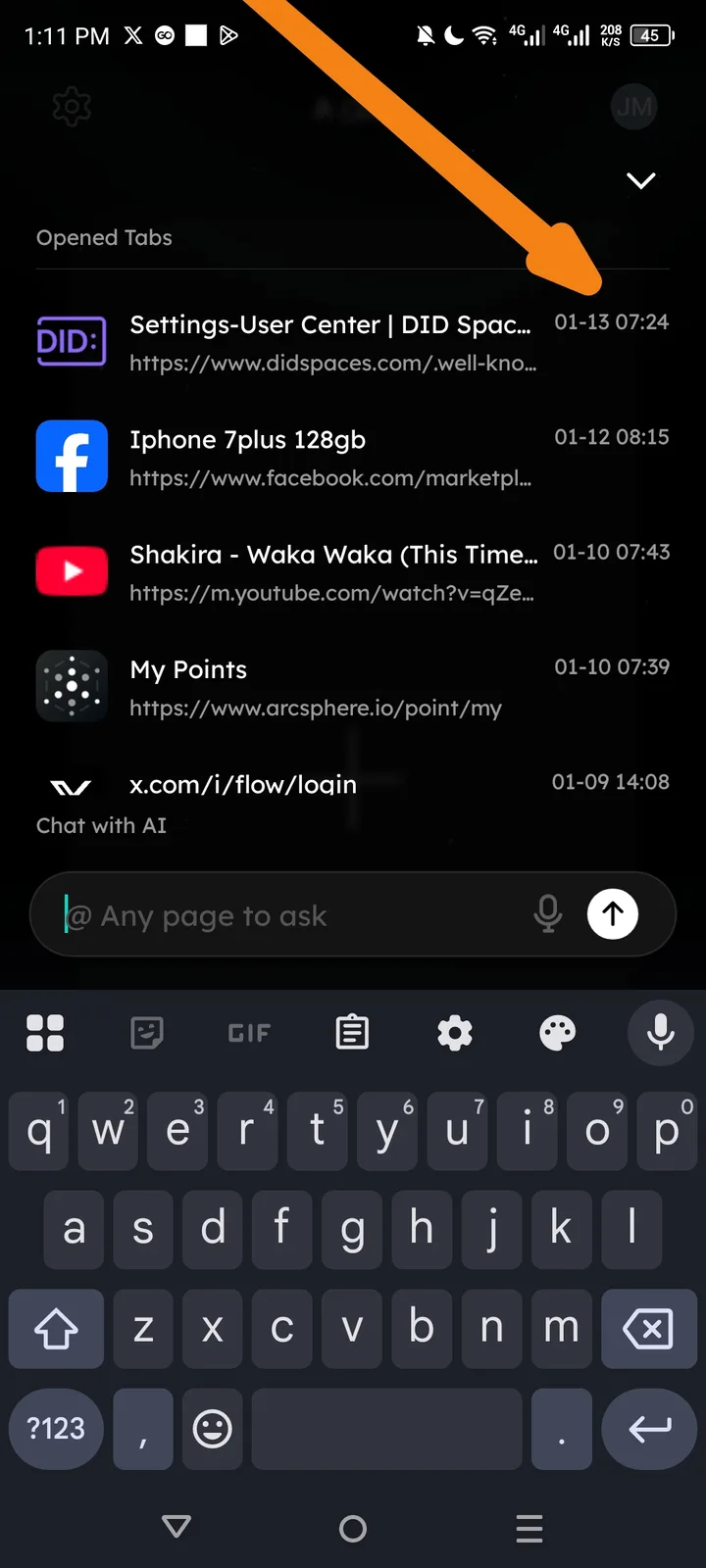
Issue Description
I am an active user of the Arcsphere browser, but I have noticed two critical issues in the "Opened Tabs" section:
- Missing Records: Despite it being February, there are no records showing for this month. The history stops at January (01-13).
- Ambiguous Timestamps: The timestamps currently only show Month and Day (MM-DD). There is no year specified, making it difficult to track long-term history.
Impact
- Data Loss/Visibility: Users cannot verify or return to their most recent activities for the current month.
- Chronological Confusion: Without a year specification, history records will become indistinguishable once the application has been used for over 12 months.
- User Experience (UX): It creates doubt for the user as to whether their browsing activity is being correctly saved or tracked at all.
Steps to Reproduce
- Open the Arcsphere Browser.
- Navigate to the "Opened Tabs" / History view.
- Observe that even with active usage in February 2026, the list only displays entries from January.
- Note that all dates are listed as "MM-DD" without a "YYYY" format.
Recommended Fix
- Refresh Logic: Investigate the database syncing or indexing for the current month to ensure February records are displayed immediately.
- Full Date Format: Update the timestamp UI to include the year (e.g., YYYY-MM-DD or Feb 07, 2026) to ensure long-term clarity.
- Relative Headers: Implement section headers like "Today," "Yesterday," and "February 2026" to improve navigation and confirm to the user that recent data is being captured.