ArcBlock Community

DocSmith无法生成Android项目的文档

Kawa
Developers
aignebugimpact-highqualifiedresolved

Android项目的,检验参数就报错了 项目:https://github.com/Tencent/vap
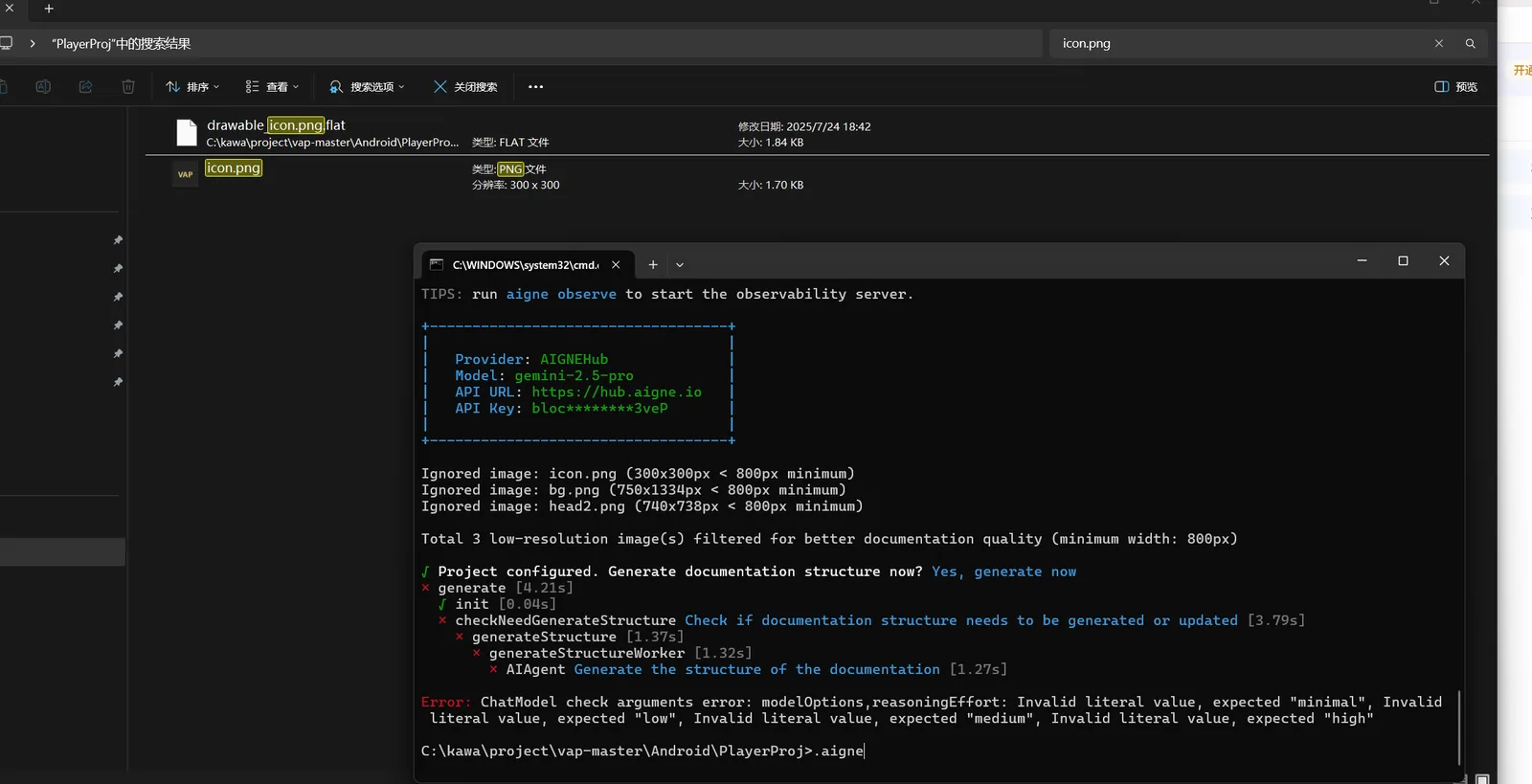
image.png

Error: ChatModel check arguments error: modelOptions,reasoningEffort: Invalid literal value, expected "minimal", Invalid literal value, expected "low", Invalid literal value, expected "medium", Invalid literal value, expected "high"

uniapp项目的就正常可以生成
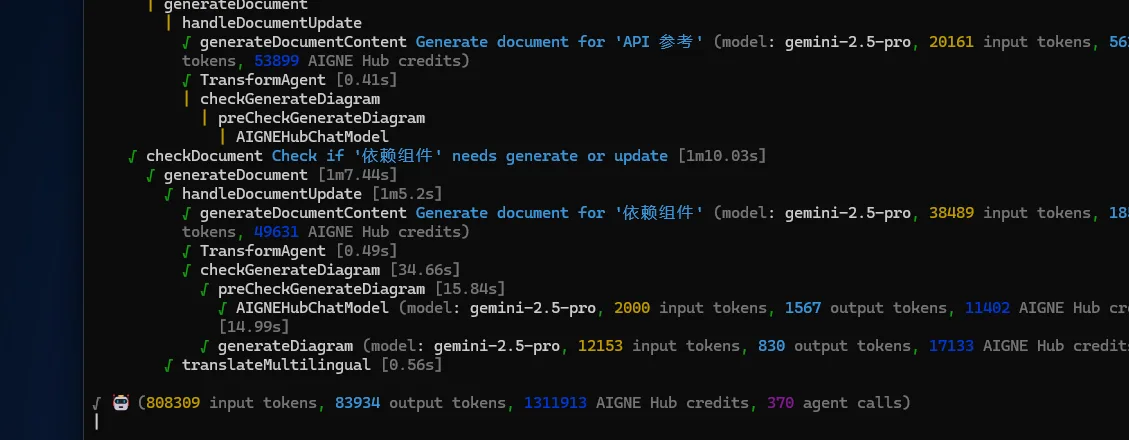
image.png

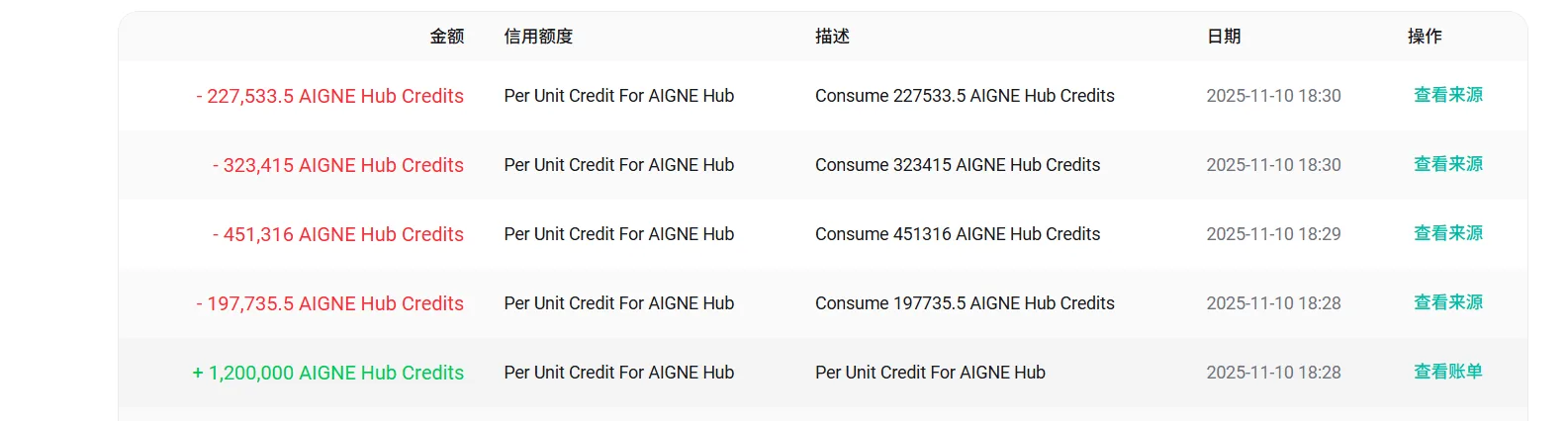
充值了3个abt还不够 Credits去生成一个项目的文档......

image.png

9 replies

Yechao Li10 months ago(edited)

z1VA6xQeBZUj8p1W7DVZiXerUm4x7rwmnLc 你好,请提供你的环境信息

  • aigne -v
  • aigne doc -v
  • where aigne
Kawa10 months ago

image.png

Yechao Li10 months ago

抱歉,根据你提供的信息,我没能复现该问题。这可能是一个隐藏的 bug,你可以先尝试再次为 vap 项目生成文档(我自己尝试过成功了😂)。

我们会继续关注这个问题,如果你再次尝试依然有问题可以继续给我们提供反馈,谢谢。

Kawa10 months ago

其实我测试了好多次Android项目都是报错的,后面才使用uniapp的进行测试才看到可以正常生成文档

Yechao Li10 months ago

请提供一下报错的项目中的 .aigne/doc-smith/config.yaml 文件内容,谢谢

Kawa10 months ago
javascriptCopy
# Project information for documentation publishing
projectName: PlayerProj
projectDesc: ""
projectLogo: ""

# AI Thinking Configuration
# thinking.effort: Determines the depth of reasoning and cognitive effort the AI uses when responding, available options:
#   - lite: Fast responses with basic reasoning
#   - standard: Balanced speed and reasoning capability
#   - pro: In-depth reasoning with longer response times
thinking:
  effort: standard

# =============================================================================
# Documentation Configuration
# =============================================================================

# Purpose: What's the main outcome you want readers to achieve?
# Available options (uncomment and modify as needed):
#   getStarted       - Get started quickly: Help new users go from zero to working in <30 minutes
#   completeTasks    - Complete specific tasks: Guide users through common workflows and use cases
#   findAnswers      - Find answers fast: Provide searchable reference for all features and APIs
#   understandSystem - Understand the system: Explain how it works, why design decisions were made
#   solveProblems    - Troubleshoot common issues: Help users troubleshoot and fix issues
#   mixedPurpose     - Serve multiple purposes: Comprehensive documentation covering multiple needs
documentPurpose:
  - getStarted

# Target Audience: Who will be reading this most often?
# Available options (uncomment and modify as needed):
#   endUsers         - End users (non-technical): People who use the product but don't code
#   developers       - Developers integrating your product/API: Engineers adding this to their projects
#   devops           - DevOps / SRE / Infrastructure teams: Teams deploying, monitoring, maintaining systems
#   decisionMakers   - Technical decision makers: Architects, leads evaluating or planning implementation
#   supportTeams     - Support teams: People helping others use the product
#   mixedTechnical   - Mixed technical audience: Developers, DevOps, and technical users
targetAudienceTypes:
  - developers

# Reader Knowledge Level: What do readers typically know when they arrive?
# Available options (uncomment and modify as needed):
#   completeBeginners    - Is a total beginner, starting from scratch: New to this domain/technology entirely
#   domainFamiliar       - Has used similar tools before: Know the problem space, new to this specific solution
#   experiencedUsers     - Is an expert trying to do something specific: Regular users needing reference/advanced topics
#   emergencyTroubleshooting - Emergency/troubleshooting: Something's broken, need to fix it quickly
#   exploringEvaluating  - Is evaluating this tool against others: Trying to understand if this fits their needs
readerKnowledgeLevel: completeBeginners

# Documentation Depth: How comprehensive should the documentation be?
# Available options (uncomment and modify as needed):
#   essentialOnly      - Essential only: Cover the 80% use cases, keep it concise
#   balancedCoverage   - Balanced coverage: Good depth with practical examples [RECOMMENDED]
#   comprehensive      - Comprehensive: Cover all features, edge cases, and advanced scenarios
#   aiDecide           - Let AI decide: Analyze code complexity and suggest appropriate depth
documentationDepth: balancedCoverage

# Custom Rules: Define specific documentation generation rules and requirements
rules: ""

# Target Audience: Describe your specific target audience and their characteristics.
targetAudience: ""

# Glossary: Define project-specific terms and definitions.
# glossary: "@glossary.md"  # Path to a markdown file containing glossary definitions.

locale: zh
# translateLanguages:  # A list of languages to translate the documentation to.
#   - zh  # Example: Chinese translation
#   - en  # Example: English translation
docsDir: .aigne/doc-smith/docs  # The directory where the generated documentation will be saved.
sourcesPath:  # The source code paths to analyze.
  - ./
# minImageWidth: Only images wider than this value (in pixels) will be used in the page generation.
media:
  minImageWidth: 300
Yechao Li10 months ago

感谢反馈,请使用 npm i -g @aigne/cli@beta 命令升级 aigne cli 到 1.54.1-beta 版本后再次运行 aigne doc gen 试试,如果还有错误请把错误信息继续反馈给我,谢谢

Kawa10 months ago(edited)

image.png

升级1.54.1-beta之后,可以正常运行

Yechao Li10 months ago

👍,如果后面使用过程中再碰到问题可以随时反馈给我们,感谢

Reply