
Bug find on DID app: create post button does not show on mobile

Noticed that when going through the app to navigate towards the community page, there is no +at the bottom right of the page to log any posts. (See screenshot) I managed to log this ‘bug’ through logging on through the internet instead of the app.
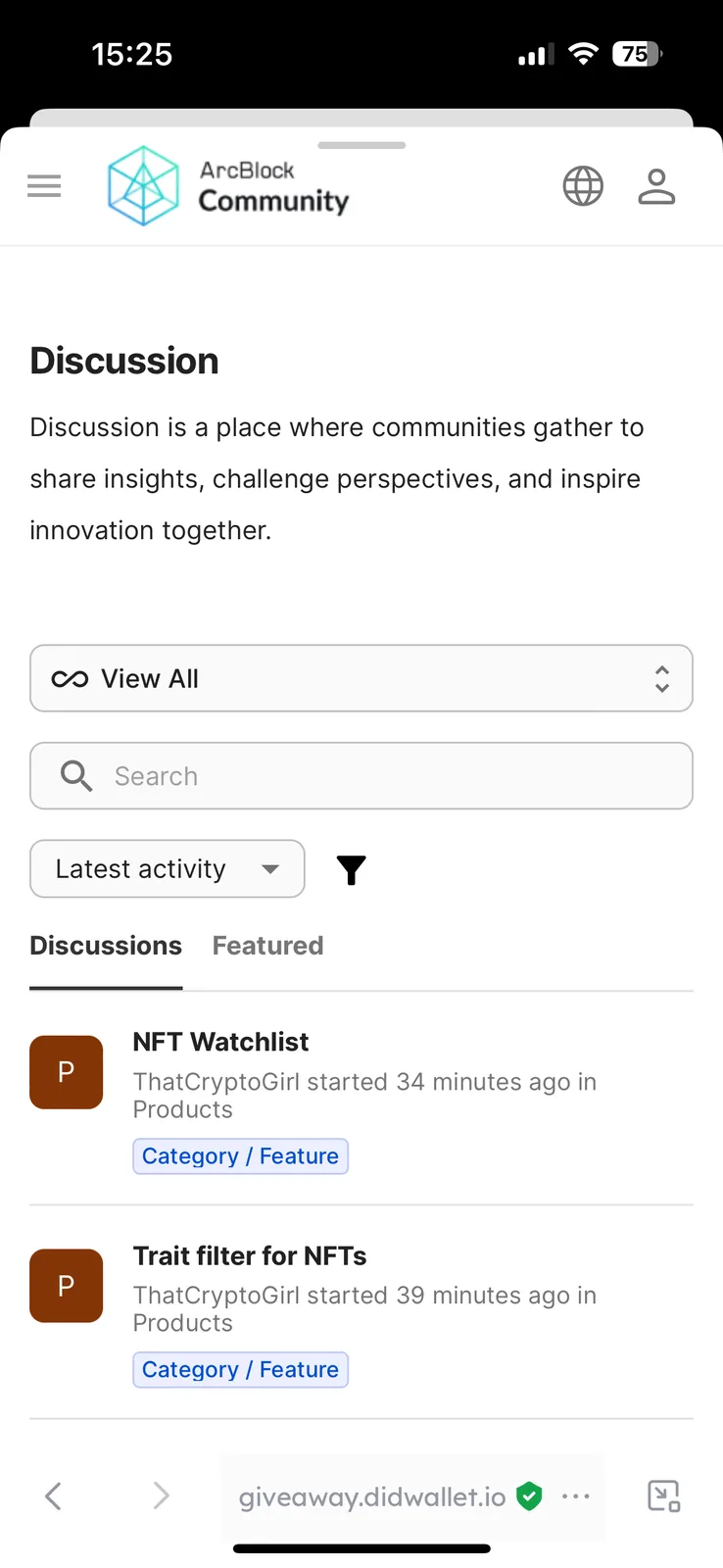
7 replies
👀
In the image it appears you werent logged in?
When logged in there will be a "Start Discussion" button at the top.
Exactly appears I’m not logged in, so why does it give me an option to log out on settings if that were the case? (see screenshot)
This was taken this morning.
Logging out in settings isnt logging out or in of the Arcblock community page 😅
that would be for logging out of the wallet entirely and removing the data (always record your secret phrase and store in a safe location).
in the browser window, top right - tap the person silhouette to sign in.
I think what he may be trying to get at is that via the app he couldn’t link/open DiD on community page, I’ve had the same issue a couple of times, normally clicking the person silhouette icon will open up the connection page but there has been a few occasions when I’ve tried it and had a similar issue with the button being unresponsive 👍 😊
Might be specific to iOS DID Wallet? I don't have this issue with Android (at the moment 😅), able to log in and out just fine of sites, and also haven't had that happen to me yet.
The latest version DID Wallet v5.2 has been released, which includes improvements for this feature. Please upgrade to verify.