
Glitchy, Non-Functional Button Displayed in ABT Reward Claim Success Modal

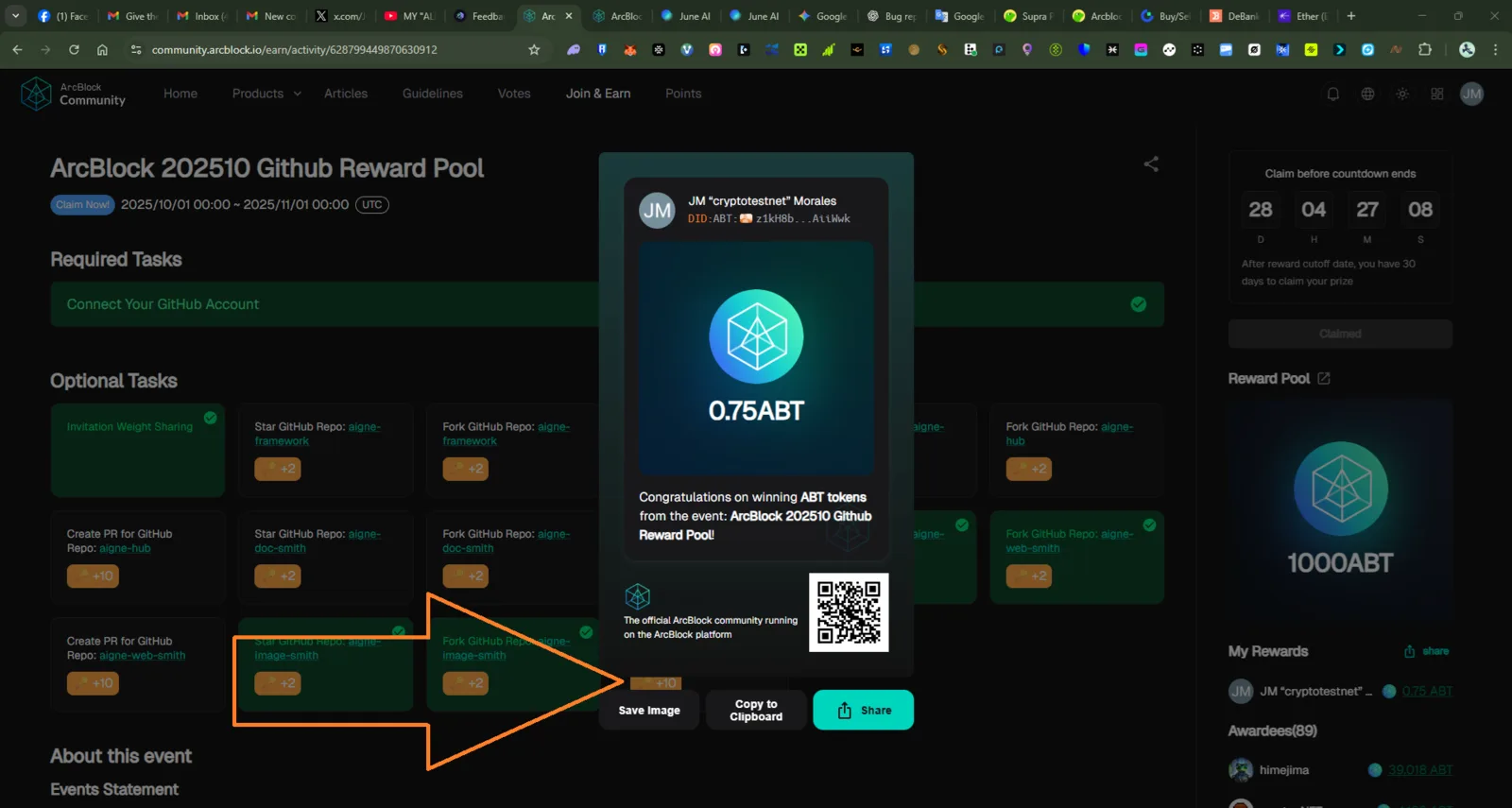
Clear Reproduction Steps
- Navigate to an ArcBlock Community Earn Activity where rewards have been earned (e.g., https://community.arcblock.io/earn/activity/628799449870630912).
- Trigger the Reward Claim Success Modal (either by claiming the reward or by the modal appearing automatically).
- Examine the modal content, specifically the footer area, next to the "Save Image" button.
- Observe the glitchy button element that displays
+10but is visually distorted (black/orange colored).
3. Expected Behavior
- Only functional and correctly styled buttons ("Save Image," "Copy to Clipboard," "Share") should be displayed in the modal footer.
- If the distorted element is intended to be a button or link, it should be fully visible, styled correctly, and functional. (Given the context, it appears to be a misplaced UI element from the main page).
4. Actual Behavior
A visually distorted, non-functional button element displaying "+10" is present in the success modal footer, overlapping the "Save Image" text area.