
Vague "Forbidden" Error for Promo Code Validation

Issue Summary
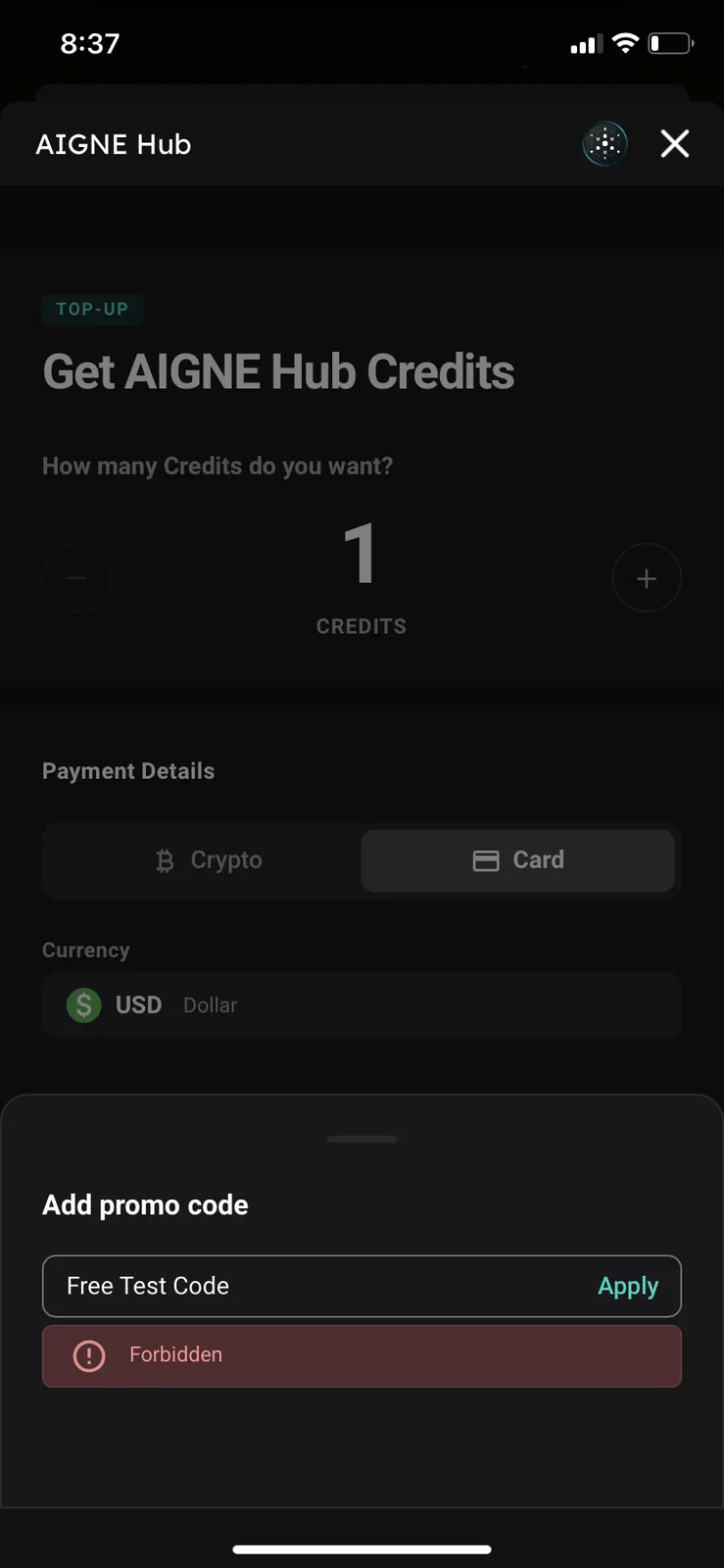
When entering an invalid or expired promo code in the AIGNE Hub top-up screen, the app displays a generic "Forbidden" error message. This feedback is technically vague and does not clearly inform the user why the code was rejected.
Environment
- App: ArcSphere (AIGNE Hub)
- Device: iPhone XR
- OS Version: iOS 18.7.3
Steps to Reproduce
- Navigate to the Top-Up / Get AIGNE Hub Credits screen.
- Scroll down to the "Add promo code" section.
- Enter a code (e.g., "Free Test Code") and tap Apply.
- Observe the error message that appears below the input field.
Expected Result
The app should provide specific, user-friendly feedback such as:
- "Invalid promo code"
- "This code has expired"
- "Code already redeemed"
Actual Result
The app displays a red box with the text "Forbidden". This suggests a server-side 403 error rather than a validation check, which can be alarming or confusing to a standard user.