
Blocklet Server; DID Spaces Personal "beta"

When installing DID Spaces Personal onto the now working node (blocklet server 1.16.20), and when requesting signature, it displays connecting with "Beta" chain and not "Main".
When attempting to finish setup, a query fails and cannot complete.
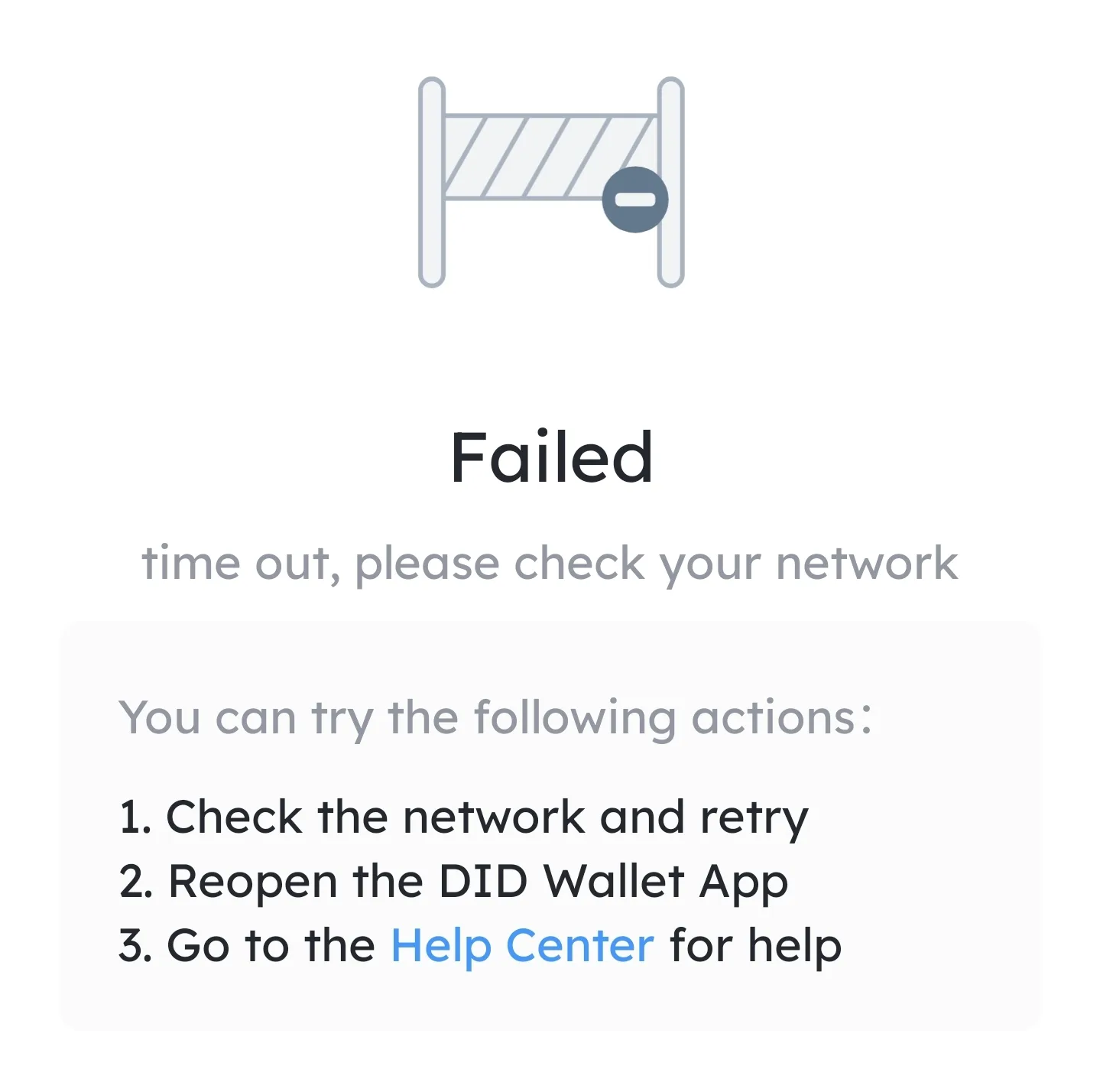
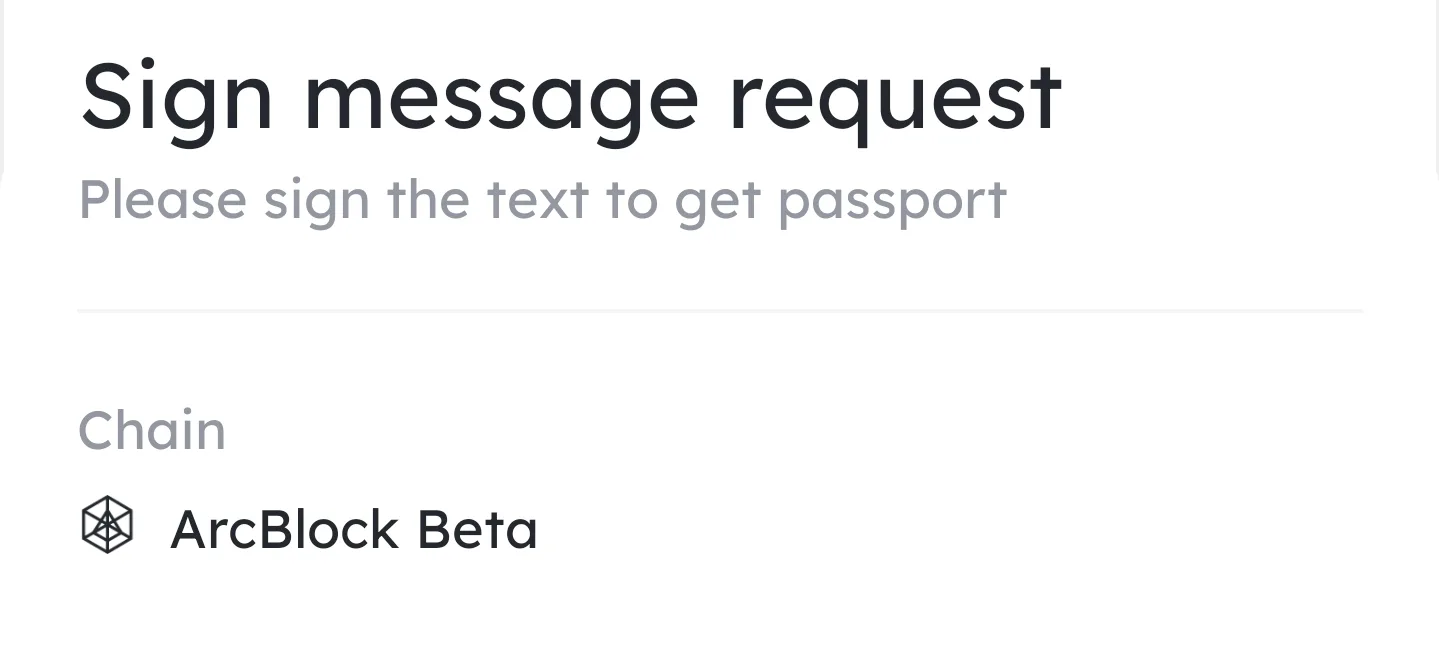
Will this be switched to main?
20 replies
Tower Blocks also falls victim to "beta" and a failed query.
I presume that will happen for the rest of the blocklets that request signature on beta chain.
AI Assistant also, and Tweet assistant. If a blocklet to be installed says Beta when key-pair generation/signing, it will fail query, but remain installed for retrying. did not see a button for checking for updates on blocklets, just server update check in settings.
blocklet store blocklet shows arcblock main during ownership message, but also fails query (looked like beta, all other "main" blocklets had a different look/color for the key-pair gen)
I'm still trying to figure out how this happened, and I need some help from you.
Could you please provide me with the steps to reproduce the problem, the address of the web page you were on when the error occurred, the platform and version of the wallet you were using?
At which step of the blocklet server and on which page did you scan the code?
I will install 1.16.20 again and re-attempt. There have been updates to didspaces core since, will post a video later of success or same issue 👍
In 1.16.20, I no longer get the "beta" message, I do still receive the timeout message, but the blocklet proceeds to the extracting screen.
from the blocklets section it shows downloading for status of did spaces personal, and within that the components show the same. seems like it half worked then gave up 😅.
will check it in 1.16.22, different post if i have the same results (minus the beta chain message). Thanks again
No timeout error on android wallet, and I recieve "Successfully..." message on server dashboard 1.16.22. So far it says extracting so ill wait 10 minutes
I feel like you took the time to test it, and it does seem like it's working properly on your end.
The beta shows after trying to start the blocklet, not during install. Sorry for the confusion.
When looking at the environment variables for the term "beta", i cant find it
Heres the video of it attempting to start, DID Spaces Core is what fails. Looking into the stderr log of did spaces core shows it trying to find sqlite3, and not finding it.
I am installing it and trying again, sqlite3 wasnt part of documentation 😅
installing sqlite3 and canvas were needed to be done for enterprise spaces to get to this next point. The error refers to did pay: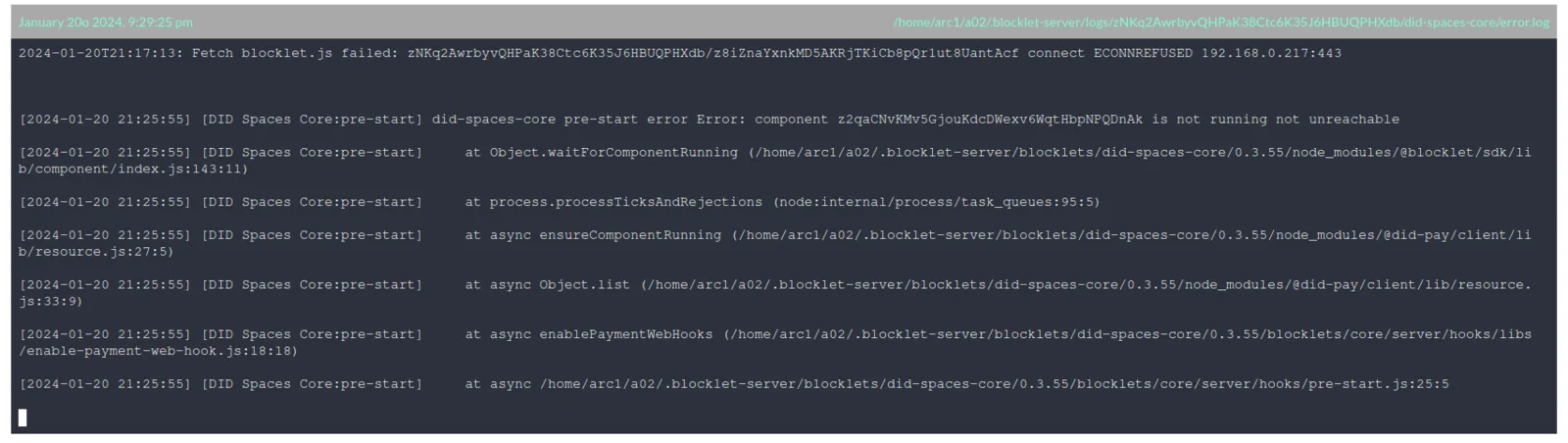 One of the other logs mentioned token balance not high enough to stake, so it skipped it - and mentions of timeouts for ports that weren't given from the blocklet server starting in the first place. I made sure ufw was running in ubuntu with 80,443,8080,and 8443 open (there was an instance where a timeout occurred looking for port 443 specifically and attached to the 'secure ip' that was given when the server started, when that port wasn't established with 'blocklet server start'. seems like it was set to that port and wasn't accounting for 8080/8443 over just 80/443. doing this caused the connection refused messages to disappear). There were not any messages relating to sqlite3 or canvas anymore after attempting to start enterprise spaces again. When it failed in the above example, I stopped the enterprise blocklet and restarted it.
Everything shows as running now, opening did spaces core ("/app") shows "pricingtableid cannot be empty". My only suggestion on enterprise spaces with blocklet/cli so far is to add these two (canvas, sqlite3) to the pre-requisites in the documentation for blocklet/cli with ubuntu, and for a more general thing - to have ufw configured correctly when needed (can this be added within the blocklet/cli processes when they are 'pre-starting' so they can set their ports correctly?).
The pricingtableid must have to do with not having anything set up in the payment kit yet for products/services?
z1QQce8QQjHJ4HGqU5f6zgE1V1nFZ8gWCpk DID Spaces Personal gets this beta message when first installing the blocklet and claiming ownership was the main target of the post - which evolved and addressed Enterprise spaces as well. There are still times when Personal (core) doesn't start the first time, but I'm fairly certain that has more to do with the hardware in use for simple testing and having too many browser activities happening.
Between the two, the main constant that seems to need adjustment (aside from pre-requisites), is the time for a timeout check when first claiming the application seems to be very short almost expecting 10 seconds or less.
DID Spaces Personal still doesn't show a pre-filled endpoint in the env when setting it up from a fresh install, so I added the chain host. it now:
TO SUM UP: DID Spaces Personal required me to enter the chain host for DID Spaces core to start.
Blocklet/cli on Ubuntu required sqlite3, canvas, and specific ports opened (which can been seen in the logs) until the process is able to open them itself.
DID Spaces Enterprise seems fine as well now, although I am unsure on the pricingtableid message and what effect that has other than not being able to open enterprise spaces.
in regards to A1: requiring chain host to be entered - i dont remember seeing an error in logs regarding it missing, but process of elimination led me to add it as a test. i had tried starting the blocklet multiple times with it failing, and then decided to do that test of adding the chain host to did spaces Personal. Enterprise had this prefilled. i just copied it over, stopped the blocklet and started it back up - had a successful start.
need to jump on linux box to get the logs prior to successful start, will add it as an edit here:
link for logs folder of server in question:
*empty files cannot be uploaded as per dropbox
https://www.dropbox.com/scl/fo/eyzqaups5tmik0d9vvo53/h?rlkey=08dhjghg7eeamh9kb7nz0lrh0&dl=0
Using 1.16.22 release though i had this issue of with betas prior to 1.16.22 as well.
I did the exact steps you showed, i just wasnt using a beta release. I left the settings as is when first launching as you showed, but no matter how many times I stopped and started the blocklet server or the blocklet itself - core would error.
After i clicked the gear icon for the settings of didspaces core - i added https://main.abtnetwork.io/api/ to the section "CHAIN_HOST". After that, I stopped the two running components and attempted to start the entire blocklet. Core errored again, the other two went through - starting just core at that time then worked without timing out.
Ive been able to do that twice, i can attempt it a third time if youd like 😅 if it ends up being Ubuntu specific then that too would make sense to me (i dont have apple, and waiting for windows version of blockletcli to test as well 😬) i also have yet to try restarting this server from the GUI but i suspect it will fail.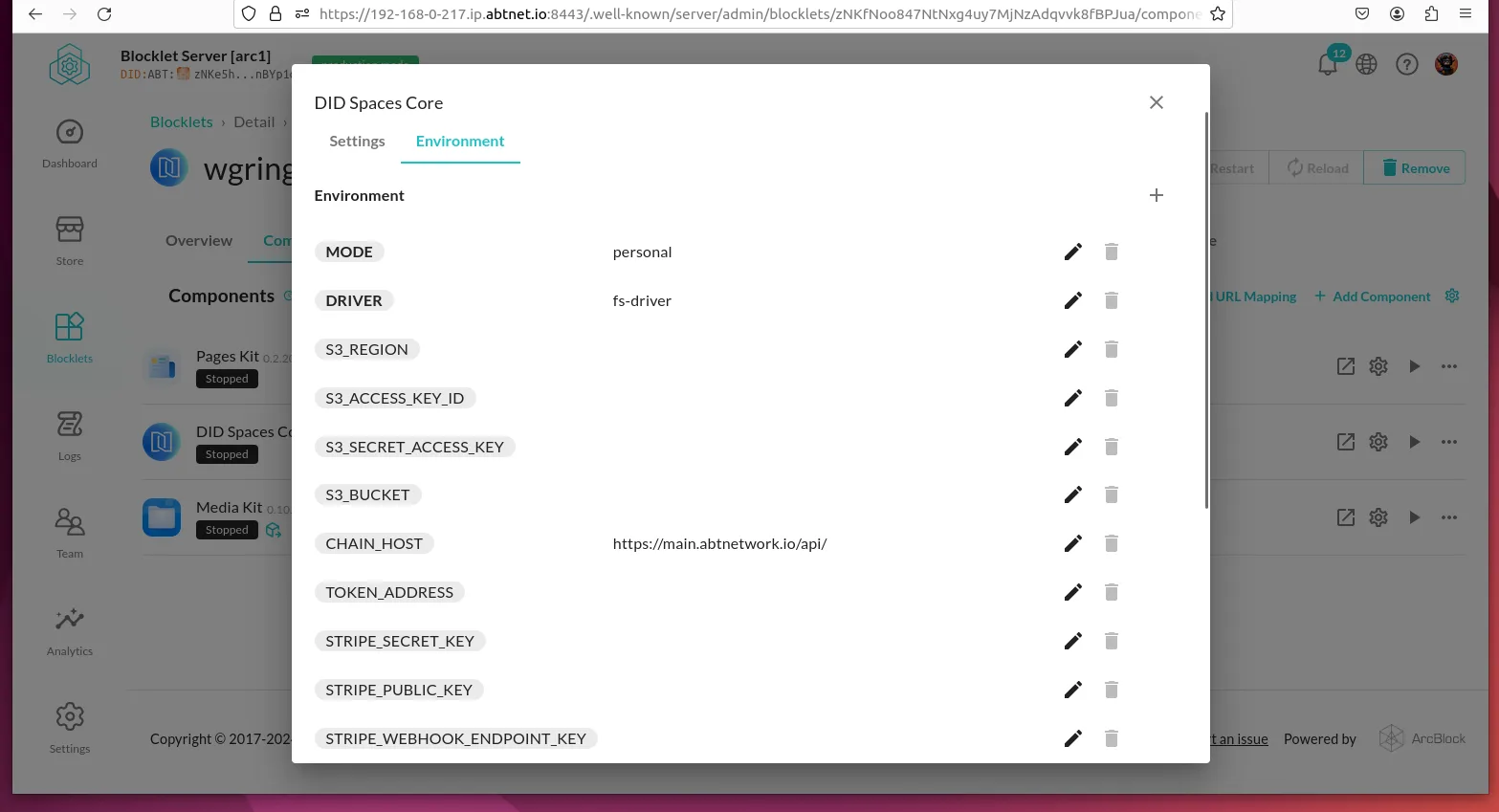
I see that your server is not running on ports 80 and 443. Didn't you use root to start the blocklet server?
Ok, I will use the official version to test this installation later.
results on theory:
tried starting enterprise spaces while personal was running. core failed.
stopped personal and started enterprise. Successful start.
started personal while enterprises running. Failed start for core.
Seems only one instance of core can be active at a time on the same blocklet server? At least for this specific setup. Maybe it wouldnt be affected with better hardware? Not so sure on that though. Seems like the separate did spaces cores are conflicting and throwing connection refused errors.<< since theyre both trying to bind to the same port/ip
as you can see from the screenshot i have it stopped, everything was running.
when restarting the blocklet - instead of every component initiating a start at once like it used to - it started them one by one. pakes kit, core, media kit.
pages kit started fine, media kit started fine, core error not ready within 58 seconds. clicking start for just core again - results in same thing.
Checked logs, and all that is different is in stdout it shows ready on port 8098.
Stopped all blocklets on the server (personal, enterprise, and nft maker), and attempted starting personal again.
During the start the blocklet server went to the connect wallet screen, somehow it logged me out. Opening did spaces personal to show components all started 🤯😅.
Im going to check something else, but its likely just resource limitations of the raspberry pi causing it, but i want to check and see if it was because enterprise spaces was running already, as nft maker doesnt have the core component. That being said nft blender 0.5.84 still doesnt load for it.
I shall return with results on theory
This looks like a local server environment installation of NFT Blender?
NFT Blender relies on node-canvas, which needs to be configured locally, you can install it by referring to this wiki.
https://github.com/Automattic/node-canvas/wiki
There are some frequently asked questions that can be found in this document
without changing setting of the blocklet install i get this when starting the app for the first time:
I choose to cancel the process.
I add chain host as "https://main.abtnetwork.io/api" and retry.
It changes, i get this:
At this point i accept ownership.
Here is acct declaration:
https://explorer.abtnetwork.io/explorer/txs/1F46E3C7FEAB025F31D795A1A2EE297E67D59BFE359D6286034C784970067B5F
when launch config shows, it now has the chain host entered and not blank, and there are no timeout errors.
i forgot to preface this because i sent it to you in chat, but this is a new server installed with sudo usage, same os install with nodejs 20now
Beta version of blocklet cli was required for did spaces personal to be able to set up a space, without beta there was a graphql 400 error everytime.