
UI Element Overlap in Chat Input Field

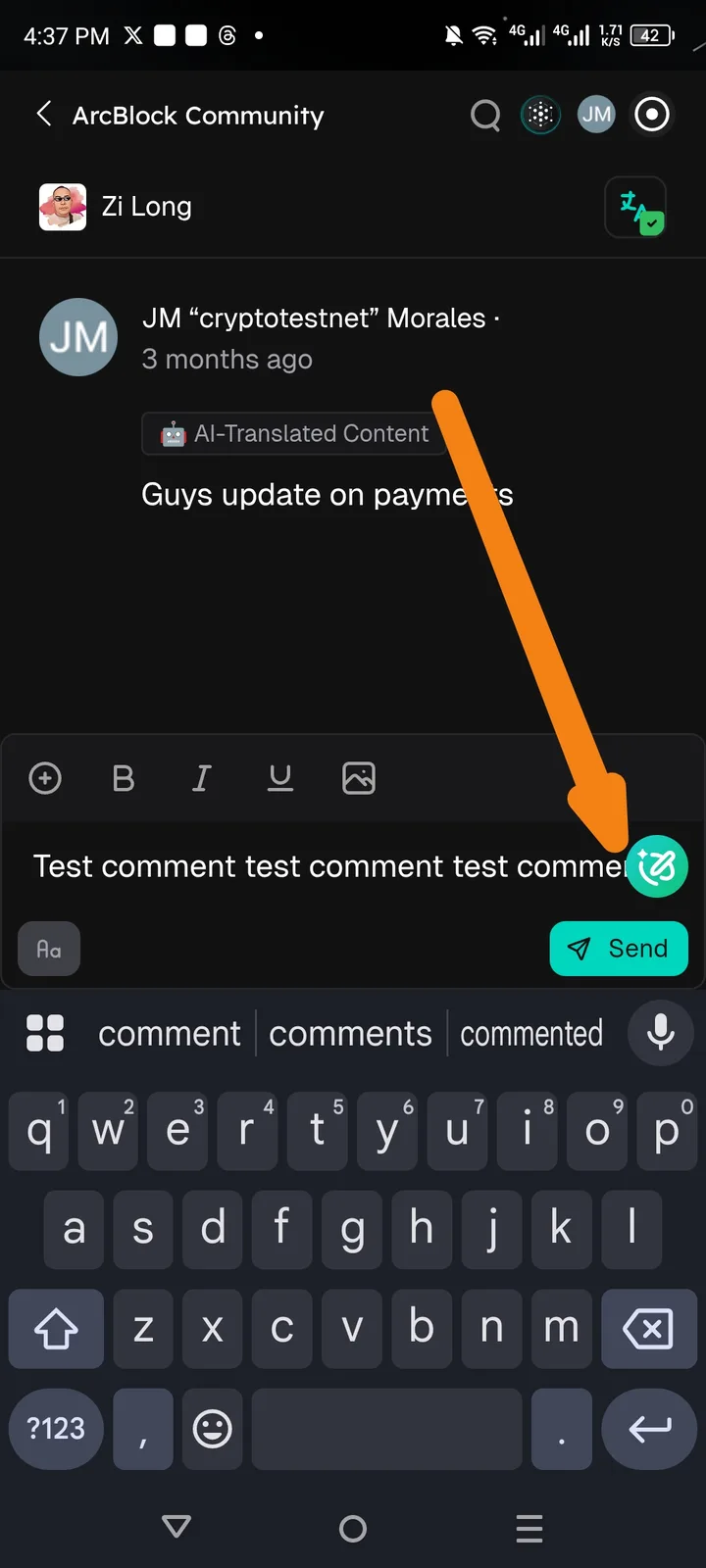
App: Arcsphere (ArcBlock Community) Issue: The action/AI button (green icon) is overlapping with the text input area, potentially obstructing visibility or making it difficult to select the end of a sentence.
Steps to Reproduce:
- Open the Arcsphere app and ArcBlock Community.
- Click on the chat.
- Type a long string of text (e.g., "Test comment test comment...").
- Observe the position of the green circular action button on the right side of the input field.
Actual Result: The green action icon sits directly on top of the text entry space, overlapping the typed characters.
Expected Result: The input field should have sufficient padding on the right, or the icon should be positioned outside the text entry area to prevent overlapping with the user's content.
Environment:
- Device: Redmi Note 10 Pro
- Screen Resolution: High aspect ratio (e.g., 20)
Suggested Fix: Increase the right-hand padding of the text input container so that the text wraps before hitting the action button.