
Incomplete Translation in Japanese Documentation

1. Summary
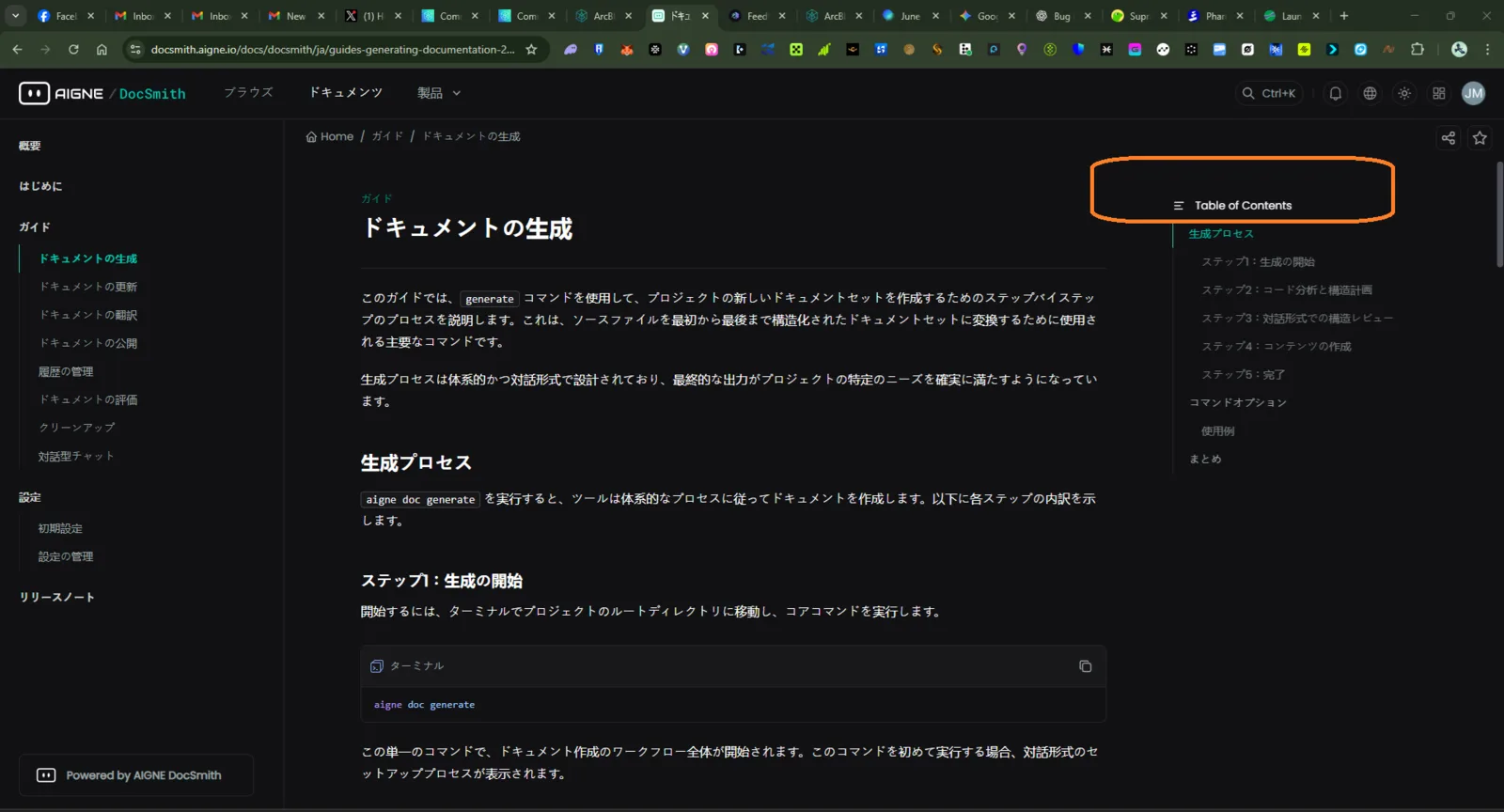
In the Japanese version of the documentation (aigne-docsmith), the Table of Contents section in the right sidebar is not translated from English to Japanese. The main body of the document is translated, leading to an inconsistent and confusing user experience.
2. Affected App/Area
- Platform: AIGNE DocSmith Documentation Platform
- Feature: Localization / Right Sidebar Table of Contents
- Language: Japanese (
ja) - URL:
aignet.io/docsmith/(ja)/guide/generating-documentation-2...
3. Steps to Reproduce
- Navigate to the AIGNE DocSmith Documentation.
- Switch the language to Japanese (ja).
- Navigate to a guide page (e.g., the "Generating Documentation" page shown in the screenshot).
- Observe the right sidebar.
4. Expected Behavior
When viewing the documentation in Japanese, the entire right sidebar, including the heading and all navigation links, should be translated into Japanese characters, consistent with the main content.
5. Actual Behavior
The right sidebar's content is displayed in English (e.g., "Table of Contents" and the list of sections below it), while the main document content is correctly displayed in Japanese (e.g., "ドキュメントの生成"). This inconsistency degrades the user experience for non-English speakers.
1 reply