
“Share” Does Not Direct to User’s Own Referral Link

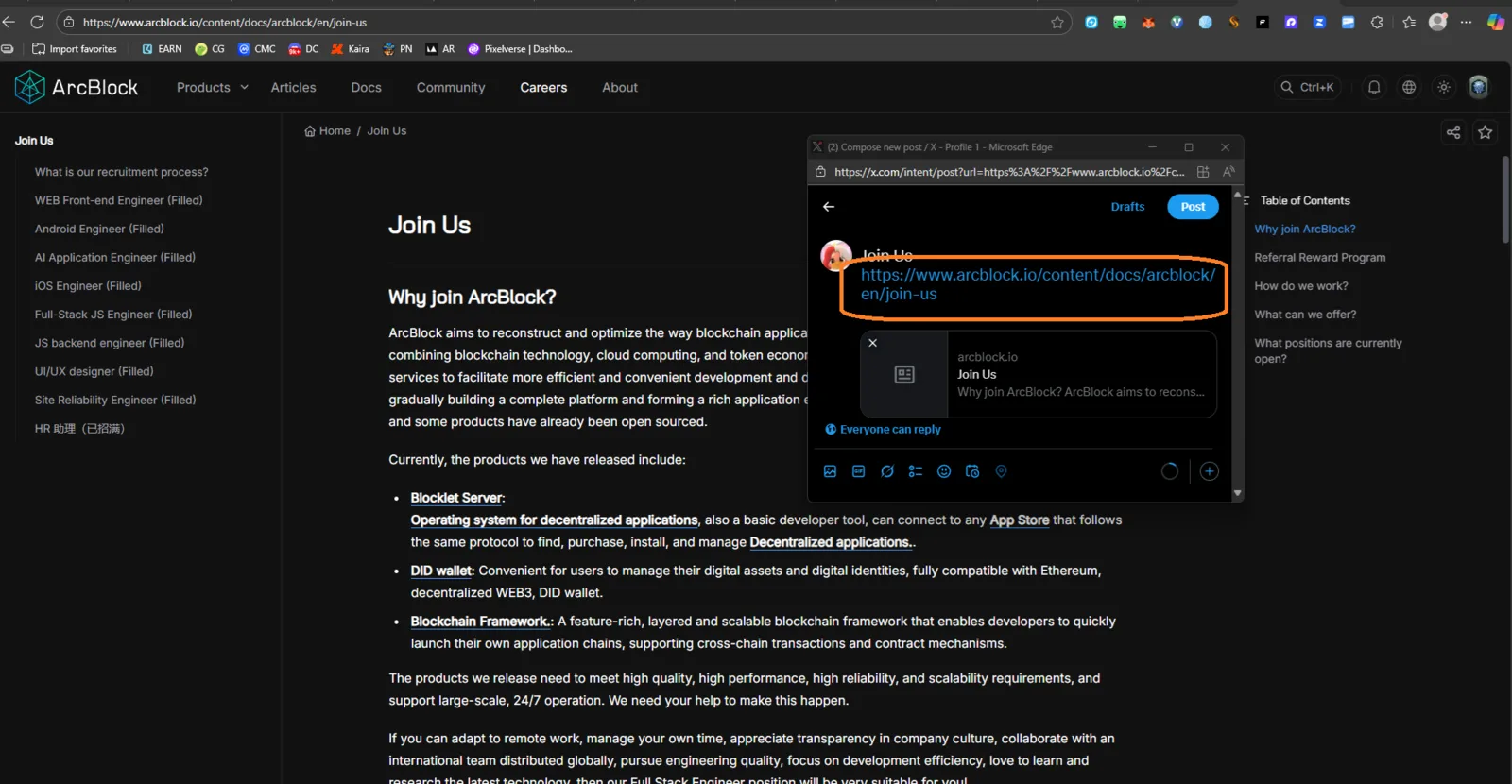
Target URL: https://www.arcblock.io/content/docs/arcblock/en/join-us Severity: Medium (Functional / UX Logic Issue) Category: Broken Link / Incorrect Referral Mapping
Summary
The “Share” feature is available on the ArcBlock Join Us page. However, when a user attempts to share, the shared URL does not direct to their own unique referral link, but instead points to a generic or static page.
This behavior breaks the intended referral tracking and reduces participation accuracy.
Steps to Reproduce
- Go to https://www.arcblock.io/content/docs/arcblock/en/join-us.
- Log in with a valid ArcBlock account (if required).
- Click the “Share” button or option.
- Check the generated/shared link.
- Observe that it does not contain your referral or user-specific ID/token.
Observed Result
- The shared link is generic or points to a default join page.
- No unique referral tracking parameter (e.g.,
?ref=usernameor?invite=userid) is included.
Expected Result
- Each user’s “Share” button should generate a personalized link containing a unique referral code.
- Recipients opening the link should be able to register under the correct inviter.