
ArcSphere Website - Missing Facebook Social Link

Summary
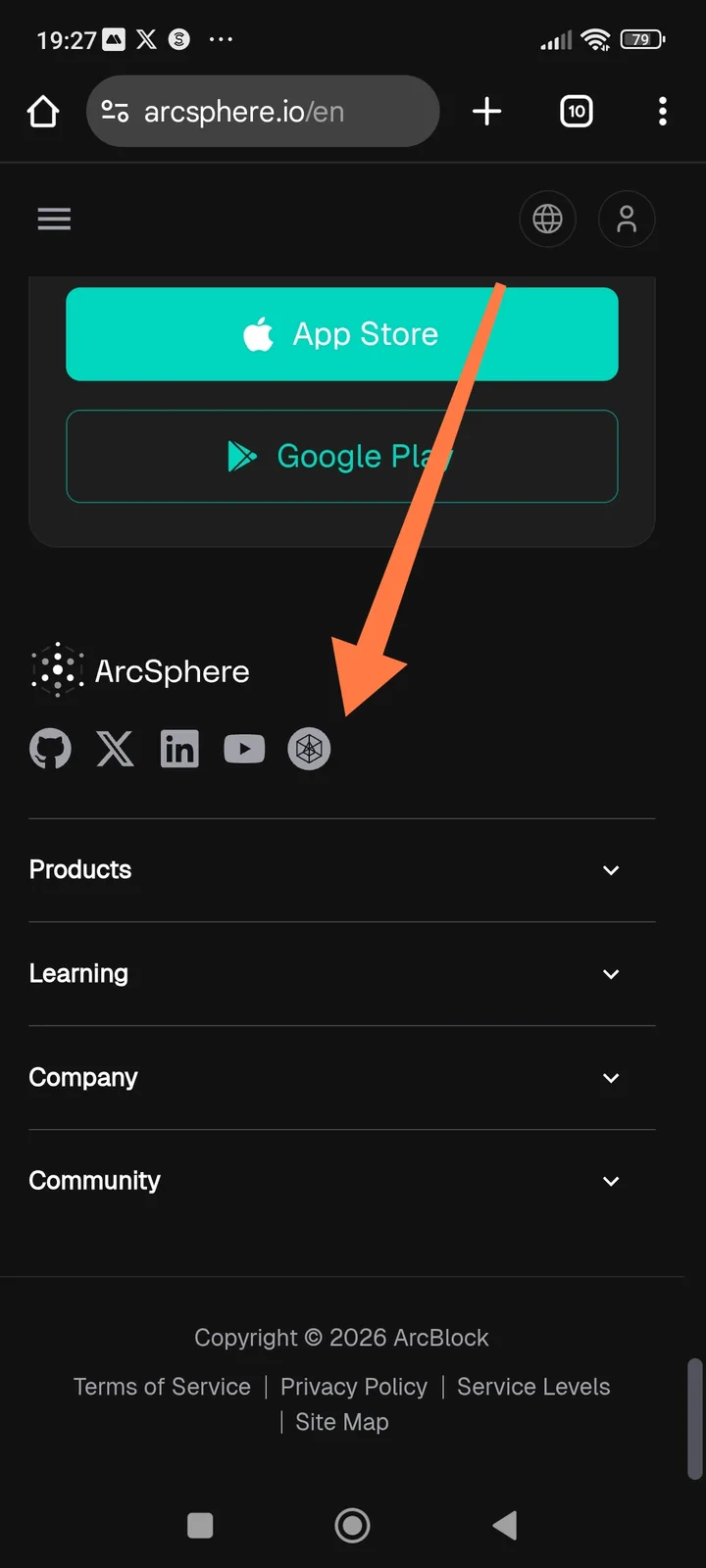
The ArcSphere website (arcsphere.io) is missing a Facebook icon and link in its social media footer section. While other major platforms like GitHub, X, LinkedIn, and YouTube are present, users cannot find or navigate to an official Facebook community page from the site.
Steps to Reproduce
- Navigate to
arcsphere.io/enon a mobile device. - Scroll down to the bottom of the page to the footer section.
- Check the row of social media icons located below the App Store/Google Play buttons.
Expected Behavior The footer should include a comprehensive list of official social media channels, including a Facebook icon link for users who prefer that platform for updates and community interaction.
Actual Behavior The Facebook logo is absent. Only the following five icons are displayed:
- GitHub
- X (formerly Twitter)
- YouTube
- ArcBlock/ArcSphere custom icon
Impact
- Accessibility: Limits the ability of Facebook-centric users to follow official project updates.
- Consistency: If an official Facebook page exists, the lack of a website link creates a gap in the cross-platform user experience.
Suggested Fix Add the Facebook icon to the footer icon set and link it to the official ArcSphere or ArcBlock Facebook page.